<?xml version="1.0" encoding="utf-8"?>
<feed xmlns="http://www.w3.org/2005/Atom">
	<title type="html"><![CDATA[ChipMusic.org - Transfer (print) an image on GB shell - how do I do that?]]></title>
	<link rel="self" href="https://chipmusic.org:80/forums/feed/atom/topic/13140/"/>
	<updated>2014-01-16T09:14:48Z</updated>
	<generator>PunBB</generator>
	<id>https://chipmusic.org/forums/topic/13140/transfer-print-an-image-on-gb-shell-how-do-i-do-that/</id>
		<entry>
			<title type="html"><![CDATA[Re: Transfer (print) an image on GB shell - how do I do that?]]></title>
			<link rel="alternate" href="https://chipmusic.org/forums/post/198186/#p198186"/>
			<content type="html"><![CDATA[<p>After some thinking and experimenting I&#039;ve decided that stencils and actual painting can work out better than decals. Decals are really cool if you want to put an image on the shell but I just want to create something of my own <img src="https://chipmusic.org/forums/img/smilies/smile.png" width="15" height="15" alt="smile" /></p>]]></content>
			<author>
				<name><![CDATA[friendofmegaman]]></name>
				<uri>https://chipmusic.org/friendofmegaman</uri>
			</author>
			<updated>2014-01-16T09:14:48Z</updated>
			<id>https://chipmusic.org/forums/post/198186/#p198186</id>
		</entry>
		<entry>
			<title type="html"><![CDATA[Re: Transfer (print) an image on GB shell - how do I do that?]]></title>
			<link rel="alternate" href="https://chipmusic.org/forums/post/198172/#p198172"/>
			<content type="html"><![CDATA[<p>On clear coating:&nbsp; I&#039;ve shot clear over white decal paper before (usually with Krylon Crystal Clear, flat) without any issues.&nbsp; I like to apply my decals to the base coat.&nbsp; Some people advocate for brushing on some clear where you wish to place the decal, but then you risk trapped solvents creating bubbles.&nbsp; If using water-slide decals, let it dry twice as long as recommended, just to be safe.&nbsp; Once your decals are in place, apply multiple coats of clear, following the instructions on the can.&nbsp; I have trouble getting some decals, especially water slide decals, to stay adhered to matte finishes.</p><p>One problem with decal paper is that you can&#039;t really use the transparent paper on black, or other dark colors.&nbsp; The decal either won&#039;t show up at all, or the colors will be muted.&nbsp; This sucks for when you want to do text or something else that&#039;s too finely detailed to cut around.&nbsp; I&#039;m starting to think that laser cut stencils are the way to go....</p>]]></content>
			<author>
				<name><![CDATA[Sunmaster_XIV]]></name>
				<uri>https://chipmusic.org/Sunmaster_XIV</uri>
			</author>
			<updated>2014-01-16T03:10:33Z</updated>
			<id>https://chipmusic.org/forums/post/198172/#p198172</id>
		</entry>
		<entry>
			<title type="html"><![CDATA[Re: Transfer (print) an image on GB shell - how do I do that?]]></title>
			<link rel="alternate" href="https://chipmusic.org/forums/post/197264/#p197264"/>
			<content type="html"><![CDATA[<p>Some web research brings me to the conclusion that a clear coat should be used indeed. You&#039;d want to use it even for solid paint job without any decals and images. My two concerns are - (1) will it whiten the paint / image? and (2) can it damage the paint / image? I understand that if you apply too much of the stuff then it&#039;s probably a yes for both, I wonder how forgiving are these clear coats?</p>]]></content>
			<author>
				<name><![CDATA[friendofmegaman]]></name>
				<uri>https://chipmusic.org/friendofmegaman</uri>
			</author>
			<updated>2014-01-08T23:20:58Z</updated>
			<id>https://chipmusic.org/forums/post/197264/#p197264</id>
		</entry>
		<entry>
			<title type="html"><![CDATA[Re: Transfer (print) an image on GB shell - how do I do that?]]></title>
			<link rel="alternate" href="https://chipmusic.org/forums/post/197254/#p197254"/>
			<content type="html"><![CDATA[<p>While we&#039;re on the topic, I have a follow-up question, since I&#039;ve got a couple of decal-related project ideas I&#039;ve been kicking around for a while.<br />How does one make sure that decals and stickers and the like stay on for good? Should some kind of clear coat be used or what?</p>]]></content>
			<author>
				<name><![CDATA[PianoGameboy]]></name>
				<uri>https://chipmusic.org/PianoGameboy</uri>
			</author>
			<updated>2014-01-08T22:21:54Z</updated>
			<id>https://chipmusic.org/forums/post/197254/#p197254</id>
		</entry>
		<entry>
			<title type="html"><![CDATA[Re: Transfer (print) an image on GB shell - how do I do that?]]></title>
			<link rel="alternate" href="https://chipmusic.org/forums/post/197191/#p197191"/>
			<content type="html"><![CDATA[<div class="quotebox"><cite>dc6v wrote:</cite><blockquote><p>and you can shove the decal paper in the printer or what?</p></blockquote></div><p>You can.<br />There are videos out there and i also have sheet&#039;s of the paper here. There are a lil&#039; bit thicker, but not to much.<br />But still, it ain&#039;t so easy, and of course they look best if you make it on bright colors and/or best white.</p>]]></content>
			<author>
				<name><![CDATA[9-Heart]]></name>
				<uri>https://chipmusic.org/9-Heart</uri>
			</author>
			<updated>2014-01-08T00:51:11Z</updated>
			<id>https://chipmusic.org/forums/post/197191/#p197191</id>
		</entry>
		<entry>
			<title type="html"><![CDATA[Re: Transfer (print) an image on GB shell - how do I do that?]]></title>
			<link rel="alternate" href="https://chipmusic.org/forums/post/197189/#p197189"/>
			<content type="html"><![CDATA[<p>and you can shove the decal paper in the printer or what?</p>]]></content>
			<author>
				<name><![CDATA[dc6v]]></name>
				<uri>https://chipmusic.org/dc6v</uri>
			</author>
			<updated>2014-01-08T00:49:01Z</updated>
			<id>https://chipmusic.org/forums/post/197189/#p197189</id>
		</entry>
		<entry>
			<title type="html"><![CDATA[Re: Transfer (print) an image on GB shell - how do I do that?]]></title>
			<link rel="alternate" href="https://chipmusic.org/forums/post/197187/#p197187"/>
			<content type="html"><![CDATA[<p>at hobby stores you will find sheets of decal paper suited for home printers.&nbsp; you can print whatever you&#039;d like, trim it, apply, and clean.&nbsp; pretty straightforward when you read the instructions.</p><p>there might be two kinds, one with a template you use to print out on pre-cut parts, and full sheets.&nbsp; get the kind that is a full sheet of decal paper.&nbsp; should come in a pack of 5, 10, 15, 25 sheets or something like this.</p>]]></content>
			<author>
				<name><![CDATA[kitsch]]></name>
				<uri>https://chipmusic.org/kitsch</uri>
			</author>
			<updated>2014-01-08T00:07:58Z</updated>
			<id>https://chipmusic.org/forums/post/197187/#p197187</id>
		</entry>
		<entry>
			<title type="html"><![CDATA[Transfer (print) an image on GB shell - how do I do that?]]></title>
			<link rel="alternate" href="https://chipmusic.org/forums/post/197186/#p197186"/>
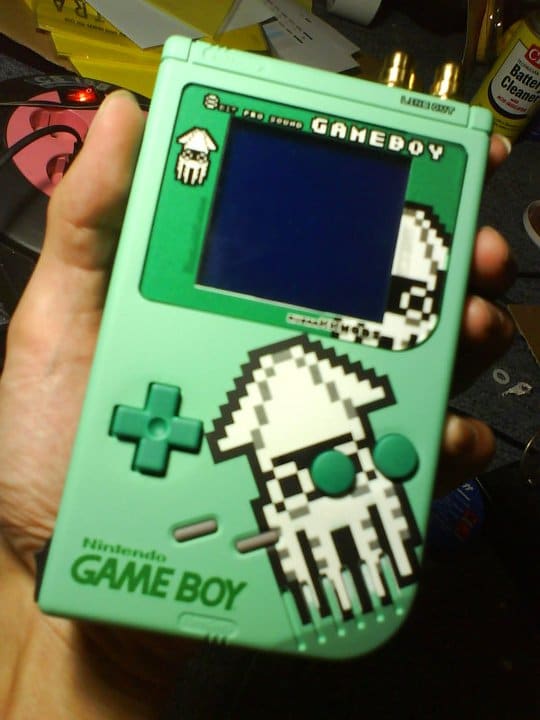
			<content type="html"><![CDATA[<p>Greetings everybody,</p><p>There&#039;s a number of FAQs / tutorials about how to paint your gameboy in solid color or multiple colors. It seems to be pretty straightforward. What I can&#039;t find is how do I transfer an image on a gameboy shell? Like it&#039;s done in the picture attached. Thanks!</p><br /><p><a class="postimg" href="http://www.gamesniped.com/wp-content/uploads/2011/07/GAMEBOY-DMG-PRO-SOUND-GREEN-BLOOPER-CUSTOM-PAINT.jpg" title="http://www.gamesniped.com/wp-content/uploads/2011/07/GAMEBOY-DMG-PRO-SOUND-GREEN-BLOOPER-CUSTOM-PAINT.jpg" id="forum_image_67191465"><img src="http://www.gamesniped.com/wp-content/uploads/2011/07/GAMEBOY-DMG-PRO-SOUND-GREEN-BLOOPER-CUSTOM-PAINT.jpg" /></a></p>]]></content>
			<author>
				<name><![CDATA[friendofmegaman]]></name>
				<uri>https://chipmusic.org/friendofmegaman</uri>
			</author>
			<updated>2014-01-08T00:03:32Z</updated>
			<id>https://chipmusic.org/forums/post/197186/#p197186</id>
		</entry>
</feed>