<?xml version="1.0" encoding="utf-8"?>
<feed xmlns="http://www.w3.org/2005/Atom">
	<title type="html"><![CDATA[ChipMusic.org - How To Heaps Noise: Sample abuse in LSDJ]]></title>
	<link rel="self" href="https://chipmusic.org:80/forums/feed/atom/topic/13733/"/>
	<updated>2015-01-21T04:06:57Z</updated>
	<generator>PunBB</generator>
	<id>https://chipmusic.org/forums/topic/13733/how-to-heaps-noise-sample-abuse-in-lsdj/</id>
		<entry>
			<title type="html"><![CDATA[Re: How To Heaps Noise: Sample abuse in LSDJ]]></title>
			<link rel="alternate" href="https://chipmusic.org/forums/post/224936/#p224936"/>
			<content type="html"><![CDATA[<p>Oh yeah, you&#039;ve got some great sounds in there! I need to give monowave another shot. Used in piggy but only barely touched it as a kit.</p>]]></content>
			<author>
				<name><![CDATA[egr]]></name>
				<uri>https://chipmusic.org/egr</uri>
			</author>
			<updated>2015-01-21T04:06:57Z</updated>
			<id>https://chipmusic.org/forums/post/224936/#p224936</id>
		</entry>
		<entry>
			<title type="html"><![CDATA[Re: How To Heaps Noise: Sample abuse in LSDJ]]></title>
			<link rel="alternate" href="https://chipmusic.org/forums/post/224935/#p224935"/>
			<content type="html"><![CDATA[<p>Sweet, I&#039;ll check your recordings out!</p><p>For tuning your kits use the pitch setting in the instrument screen. 01-8F pitches up, FF-90 pitches down with 8F being the highest and 90 the lowest which is sorta weird.</p>]]></content>
			<author>
				<name><![CDATA[egr]]></name>
				<uri>https://chipmusic.org/egr</uri>
			</author>
			<updated>2015-01-21T03:49:43Z</updated>
			<id>https://chipmusic.org/forums/post/224935/#p224935</id>
		</entry>
		<entry>
			<title type="html"><![CDATA[Re: How To Heaps Noise: Sample abuse in LSDJ]]></title>
			<link rel="alternate" href="https://chipmusic.org/forums/post/224933/#p224933"/>
			<content type="html"><![CDATA[<p>When this album originally came out, I was really inspired to do more sample manipulation stuff on lsdj. I downloaded the save and writeup and immediately started playing. I ended up with this:<br /><a href="http://chipmusic.org/xuriik/music/calcified-pineal-gland" target="_blank">http://chipmusic.org/xuriik/music/calci &#133; neal-gland</a></p><p>I thought I&#039;d try getting this in tune this time, and figured I&#039;d try using the <a href="http://chipmusic.org/forums/topic/8287/hexawemonorave/" target="_blank">monowave</a> for single waveform synthesis... But TSP commands don&#039;t work on kits! So I was stuck using pitch bends creatively to hold more or less steady tones. It can get tedious and wasn&#039;t really working for me, but I still think the capability of having different timbres on a single kit is pretty neat. I experimented with this <a href="https://www.dropbox.com/s/g1a5z0tpfkqr33v/lsdj%20monowave.zip?dl=0" target="_blank">briefly, here</a> (a sav, a kit, and an mp3; note that the kit is assigned to slot 36, or $24).</p><p>In that sav, each instrument from 01 to 20 is just the same monowave kit, with a length of 5, set to different offsets, increasing by 5 and then by 11 with each instrument. I don&#039;t really know how these offset values work, so I probably didn&#039;t cut up each waveform properly. I&#039;d assume the sample is divided into FF equal parts, which means you pretty much have to wing it?</p><p>And the mp3 is me cycling through those instruments in live mode, playing the loop that&#039;s programmed in the sav.</p>]]></content>
			<author>
				<name><![CDATA[Xuriik]]></name>
				<uri>https://chipmusic.org/Xuriik</uri>
			</author>
			<updated>2015-01-21T03:39:36Z</updated>
			<id>https://chipmusic.org/forums/post/224933/#p224933</id>
		</entry>
		<entry>
			<title type="html"><![CDATA[Re: How To Heaps Noise: Sample abuse in LSDJ]]></title>
			<link rel="alternate" href="https://chipmusic.org/forums/post/224886/#p224886"/>
			<content type="html"><![CDATA[<p>Bonus tip:</p><p>In a kit instrument&#039;s table, put this at the top of one of the effect columns</p><p>F01<br />H00</p>]]></content>
			<author>
				<name><![CDATA[egr]]></name>
				<uri>https://chipmusic.org/egr</uri>
			</author>
			<updated>2015-01-20T13:41:24Z</updated>
			<id>https://chipmusic.org/forums/post/224886/#p224886</id>
		</entry>
		<entry>
			<title type="html"><![CDATA[Re: How To Heaps Noise: Sample abuse in LSDJ]]></title>
			<link rel="alternate" href="https://chipmusic.org/forums/post/204065/#p204065"/>
			<content type="html"><![CDATA[<p>I always forget to mention that you can very quickly crash a dmg with this technique.&nbsp; Gbc and newer is recommended.</p>]]></content>
			<author>
				<name><![CDATA[egr]]></name>
				<uri>https://chipmusic.org/egr</uri>
			</author>
			<updated>2014-03-23T03:33:08Z</updated>
			<id>https://chipmusic.org/forums/post/204065/#p204065</id>
		</entry>
		<entry>
			<title type="html"><![CDATA[How To Heaps Noise: Sample abuse in LSDJ]]></title>
			<link rel="alternate" href="https://chipmusic.org/forums/post/204020/#p204020"/>
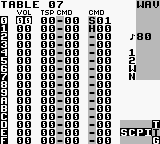
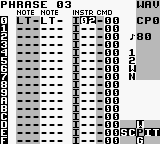
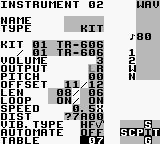
			<content type="html"><![CDATA[<p><em>This is the text of a pdf that I included along with the associated sav file in the download of my album &quot;HYMNAL&quot; as Abandoned On Fire.&nbsp; Adding here to promote discussion and hopefully get some more ideas for LSDJ noise.</em></p><p><strong>HOW TO HEAPS NOISE: Sample abuse in LSDJ</strong><br />By Arnie Holder a.k.a. Abandoned On Fire </p><p>The album that this pdf came with ( HYMNAL, <a href="http://datathrash.bandcamp.com/album/HYMNAL" target="_blank">http://datathrash.bandcamp.com/album/HYMNAL</a> ) is based around <br />a single noise making technique. LSDJ already has hissy, grindy sample playback but when you start using those <br />samples or parts of those samples as waveforms for further synthesis things can get truly noisy in the best way <br />possible. </p><p>Let’s look at a few of the “noise synthesis” techniques used on HYMNAL, shall we? </p> <br /><p><a class="postimg" href="http://i157.photobucket.com/albums/t73/arniepics_2007/screen1_zpsfc92cd74.png" title="http://i157.photobucket.com/albums/t73/arniepics_2007/screen1_zpsfc92cd74.png" id="forum_image_73529212"><img src="http://i157.photobucket.com/albums/t73/arniepics_2007/screen1_zpsfc92cd74.png" /></a></p><br /><p>Above is a phrase containing one of my favorite sounds from the album. It’s about mid-way through Hymn Of <br />Joyful Noise and lasts for several seconds, a pulsing and phasing type distorted sound. </p> <br /><p><a class="postimg" href="http://i157.photobucket.com/albums/t73/arniepics_2007/screen2_zps0daa55f4.png" title="http://i157.photobucket.com/albums/t73/arniepics_2007/screen2_zps0daa55f4.png" id="forum_image_90190369"><img src="http://i157.photobucket.com/albums/t73/arniepics_2007/screen2_zps0daa55f4.png" /></a></p><br /><p>Here’s the instrument screen. First, remember that the same sample is playing in both columns of the phrase. <br />Now look at the offset for each sample. They been “trimmed down” to different lengths and are both set to loop <br />so that they will go in and out of time with each other (also, in this case I set the playback to 50% for a deeper <br />tone). </p><p>The distortion field is where the “trial and error” phase of the process starts. With the cursor on the DIST field and <br />set to CLIP, hold A and tap LEFT twice or until the CLIP turns into ?CF00. You’ll immediately hear the volume of the <br />instrument go way up and it will usually get really staticy and distorted. Cool! Now continue to hold A and tap left slowly while listening to how the sound changes. You’ll go through sections where there may be no sound at <br />all or only a tiny crackle. Keep exploring, small changes can make an enormous difference. <em>Ed. Tap up/down to move through values faster!</em></p> <br /><p><a class="postimg" href="http://i157.photobucket.com/albums/t73/arniepics_2007/screen3_zps91467bca.png" title="http://i157.photobucket.com/albums/t73/arniepics_2007/screen3_zps91467bca.png" id="forum_image_38943878"><img src="http://i157.photobucket.com/albums/t73/arniepics_2007/screen3_zps91467bca.png" /></a></p><br /><p>Everybody’s favorite topic, tables! This instrument has a very simple table but it demonstrates the most powerful <br />command for sample abuse. On KIT instruments, the S command changes both the loop length and offset. In this <br />case I’m only changing the length and with the H command I’m changing it on every tick. So every time the sample <br />loops (or even when it’s looping?) it will loop from a different point. And since each sample is set to a different <br />length they ... will loop ... different ... basically sound all jacked up, OK? </p><p>Not shown here but another good command for sample synthesis is the G command. Even if you don’t use <br />multiple grooves in your song, placing a G00 in your table will slow down the table speed to the phrase speed and <br />give your commands more time to act on the sound. </p><p>Hmmm, what’s some other fun stuff..... Oh! R commands on samples set up like above can create some amazing <br />sounds if you let them run for many many steps. Some of the most intense sounds on the album only happen after <br />16 or 32 steps of a retrigging sound. A good example of that would be around the middle of Hymn Of Loneliness, <br />you’ll know it when you hear it! </p><p>So, yeah. Get noisy! Load up the SAV that also came with the album and explore and debase it. Custom kits? Oh <br />hell yeah! But that’s a topic for another time. </p><p>Later.</p>]]></content>
			<author>
				<name><![CDATA[egr]]></name>
				<uri>https://chipmusic.org/egr</uri>
			</author>
			<updated>2014-03-22T16:31:43Z</updated>
			<id>https://chipmusic.org/forums/post/204020/#p204020</id>
		</entry>
</feed>