<?xml version="1.0" encoding="utf-8"?>
<feed xmlns="http://www.w3.org/2005/Atom">
	<title type="html"><![CDATA[ChipMusic.org - Help with ProTracker 3 for Speccy]]></title>
	<link rel="self" href="https://chipmusic.org:80/forums/feed/atom/topic/14763/"/>
	<updated>2015-10-27T14:22:51Z</updated>
	<generator>PunBB</generator>
	<id>https://chipmusic.org/forums/topic/14763/help-with-protracker-3-for-speccy/</id>
		<entry>
			<title type="html"><![CDATA[Re: Help with ProTracker 3 for Speccy]]></title>
			<link rel="alternate" href="https://chipmusic.org/forums/post/235803/#p235803"/>
			<content type="html"><![CDATA[<p>Maybe write me this question to my e&#039;mail address. <br />I will forward it to Alone Coder, surely he could help.</p>]]></content>
			<author>
				<name><![CDATA[YERZMYEY]]></name>
				<uri>https://chipmusic.org/YERZMYEY</uri>
			</author>
			<updated>2015-10-27T14:22:51Z</updated>
			<id>https://chipmusic.org/forums/post/235803/#p235803</id>
		</entry>
		<entry>
			<title type="html"><![CDATA[Re: Help with ProTracker 3 for Speccy]]></title>
			<link rel="alternate" href="https://chipmusic.org/forums/post/235802/#p235802"/>
			<content type="html"><![CDATA[<p>hello,</p><p>I asked about ProTracker 3 on WoS (<a href="http://www.worldofspectrum.org/forums/discussion/48079/redirect/p1" target="_blank">http://www.worldofspectrum.org/forums/d &#133; edirect/p1</a>) and since I didn&#039;t receive answer, I copy my question here as well:</p><p>how to transfer the data to my PC?</p><p>I can save a tune into the original PT372.SCL floppy, then I used sn113 (dos tool to get data from spectrum disk) to extract the saved file to my PC. It works, I got a file.$M with data in it. But if I try to open it in vortex tracker (as pt3, I renamed the file), it&#039;s not usable. Some notes are recognised, but not everything, and therefore it&#039;s not correct.</p><p>There is a save, compile, decompile option in protracker. What are the differences? It seems save and compile are giving the same binaries in the end.</p>]]></content>
			<author>
				<name><![CDATA[garvalf]]></name>
				<uri>https://chipmusic.org/garvalf</uri>
			</author>
			<updated>2015-10-27T13:09:10Z</updated>
			<id>https://chipmusic.org/forums/post/235802/#p235802</id>
		</entry>
		<entry>
			<title type="html"><![CDATA[Re: Help with ProTracker 3 for Speccy]]></title>
			<link rel="alternate" href="https://chipmusic.org/forums/post/213557/#p213557"/>
			<content type="html"><![CDATA[<p>alone coder <img src="https://chipmusic.org/forums/img/smilies/heart.gif" width="15" height="15" alt="heart" /> <img src="https://chipmusic.org/forums/img/smilies/heart.gif" width="15" height="15" alt="heart" /> <img src="https://chipmusic.org/forums/img/smilies/heart.gif" width="15" height="15" alt="heart" /></p>]]></content>
			<author>
				<name><![CDATA[r0lemusic]]></name>
				<uri>https://chipmusic.org/r0lemusic</uri>
			</author>
			<updated>2014-07-18T08:08:53Z</updated>
			<id>https://chipmusic.org/forums/post/213557/#p213557</id>
		</entry>
		<entry>
			<title type="html"><![CDATA[Re: Help with ProTracker 3 for Speccy]]></title>
			<link rel="alternate" href="https://chipmusic.org/forums/post/213426/#p213426"/>
			<content type="html"><![CDATA[<p>Done. <img src="https://chipmusic.org/forums/img/smilies/wink.png" width="15" height="15" alt="wink" /> </p><p>Hahaha.</p>]]></content>
			<author>
				<name><![CDATA[YERZMYEY]]></name>
				<uri>https://chipmusic.org/YERZMYEY</uri>
			</author>
			<updated>2014-07-17T10:48:07Z</updated>
			<id>https://chipmusic.org/forums/post/213426/#p213426</id>
		</entry>
		<entry>
			<title type="html"><![CDATA[Re: Help with ProTracker 3 for Speccy]]></title>
			<link rel="alternate" href="https://chipmusic.org/forums/post/213422/#p213422"/>
			<content type="html"><![CDATA[<p>WOHOOOOOOOOOOO!</p><p>Please, somebody tell this guy that I love that!</p>]]></content>
			<author>
				<name><![CDATA[PaK-Zer0]]></name>
				<uri>https://chipmusic.org/PaK-Zer0</uri>
			</author>
			<updated>2014-07-17T09:25:07Z</updated>
			<id>https://chipmusic.org/forums/post/213422/#p213422</id>
		</entry>
		<entry>
			<title type="html"><![CDATA[Re: Help with ProTracker 3 for Speccy]]></title>
			<link rel="alternate" href="https://chipmusic.org/forums/post/213419/#p213419"/>
			<content type="html"><![CDATA[<p>Hmmm. This is an interesting finding indeed. </p><p>Meanwhile Alone Coder was so kind to make a translation of ProTracker instruction (yay!)</p><br /><p>___________ZX_PRO_TRACKER_MANUAL__________________<br />Characteristics:</p><p>√ Tempo: 1-63<br />√ Positions: 256<br />√ Patterns: 48<br />√ Pattern length: 1-64<br />√ Ornaments: 15<br />√ Samples: 31<br />√ Player size: #c00 (PT Util: #900, sources: from #632)<br />√ Sample length: 64<br />√ Ornament length: 64<br />√ TurboSound (2AY) mode (7MHz CPU or Pentagon w/o indicators)</p><p>New options above v2.x:</p><p>√ Volume (global gain)<br />√ Write data (auto-fill input note parameters with former)<br />√ Scroll step (scroll down after inputting note)<br />√ Edit melody (roll between patterns by positions order)<br />√ Set up (set colors, sound etc.)<br />√ Positions list (order of patterns playing)<br />√ Pattern length (set specified pattern length for all patterns<br /> by one click)<br />√ Clear sample, ornament<br />√ Copy sample, ornament<br />√ Volume transposition<br />√ Copy 3 channels at once (click &quot;Channel&quot;)</p><p>PT3.x can load Pro Tracker 2.x, Sound Tracker, Sound Tracker Pro<br />modules.</p><p>Frequences cumulation, volume increase/decrease, envelope mask<br />are in Edit smp.</p><p>Use -96 displacement in ornament for fix every note to C-1.<br />You haven&#039;t to set F before ornament #.</p><p>ssQ/ssW - line delete/insert commands (available anywhere).</p><p>Arrow control: Q,CS,O,P,Space (or Kempston Mouse)</p><p>Disk/compilation errors are shown on border.<br />Since v3.697 memory isn&#039;t being cleared before loading module.</p><p>Loader:</p><p>Setups are in basic block:<br /> 5d3b, 5d3c = colours;<br /> 5d3d: bit0-2 = border;<br />&nbsp; &nbsp; &nbsp; &nbsp;bit4 = &quot;play on&quot;;<br />&nbsp; &nbsp; &nbsp; &nbsp;bit5 = &quot;sound&quot;;<br />&nbsp; &nbsp; &nbsp; &nbsp;bit6 = &quot;print points&quot;;<br />&nbsp; &nbsp; &nbsp; &nbsp;bit7 = &quot;kempston joystick&quot;;<br /> 5e16: frequency table.<br />Press CS to disable indicators if your computer is slow.</p><p>Hot keys:</p><p>W - Edit melody<br />Ext - Edit pattern<br />Enter - Play</p><p>In pattern window:</p><p>0-9 (in note field are octaves)<br />А-V (input O,P with Symbol Shift; input Q with Caps Shift)<br />cs9 - begin/*centre of pattern<br />*ss9 - end of pattern<br />L - clear note<br />*ssL - clear note with parameters<br />*K - clear command field for current note<br />Enter - play while hold<br />ssE - memorize channel into buffer<br />ssR - recall channel from buffer<br />*CS(SS)+note - note with octave above(below)<br />*SS+digit - set Autoscroll<br />*cs1,cs2 - go to previous,next channel<br />*True/Inv - go between patterns<br />*ssY - switch flat/sharp for current note<br />*csU - set block begin to cursor (including pattern number &amp;<br /> channel)<br />*csI - set block end to cursor<br />*csY - copy selected block to cursor<br />*csT - transpose selected block<br />*F - empty note (autodata+autoenv+scroll)<br />*W - on/off Edit melody<br />*Ext - exit to &quot;Hot keys&quot;<br />*ssI - Edit smp<br />*ssU - Edit orn<br />*csL - edit positions order<br />*ssA - insert current note parameters into AutoData former<br />*csA - on/off AutoData<br />*csE - on/off AutoEnv<br />*E - on/off transparent envelope entering mode. Note ISN&#039;T being<br /> changed in this mode. Transparent mode is stable if AutoEnv=ON,<br /> in other case it switches itself off after inputting one note<br />*csW - on/off TurboSound mode<br />*cs0 - switch between 2 AY chips in TurboSound mode (2nd chip is<br />in patterns 47..24, these patterns must be in positions list)</p><p>2-nd column in pattern - noise shift for all channels.</p><p>Special commands (right column in every channel):</p><p>Record format: 1234<br />1 - command type<br />2 - Delay in commands 1,2,3,9,А<br />3,4 - depends of command</p><p>Command type:<br />0 - no command<br />1 - Slide down, fields 3,4 - step. Tone shift if delay=0.<br />2 - Slide up, fields 3,4 - step. Tone shift if delay=0.<br />3 - Tone Portamento, fields 3,4 - step, target note is in note<br /> field.<br /> Sample &amp; Ornament will be initialized!<br /> I don&#039;t recommend 3xxx from note to SAME note. Have pity to<br /> player!<br />4 - Sample will play from line # specified in 3,4<br />5 - same, but for Ornament<br />6 - Vibrato, in 3 - sound on duration, in 4 - sound off duration<br />9 - Envelope slide up, fields 3,4 - step<br />А - Envelope slide down<br />B - Tempo (3,4)</p><p>In positions list (order):</p><p>digits - change pattern #<br />*K - Set loop start<br />*L - Set loop end</p><p>In Edit smp (orn) menu:</p><p>*0-9 - octave<br />*True/Inv - switch between samples (ornaments)<br />ssU,ssI - switch between ornaments (samples)<br />W,E - +/-1<br />R,T - +/-32 (12)<br />*ss8,ss9 - regulate volume<br />0 - annul<br />ssK - change sign<br />*K - Set loop start (loop is magenta stripe over line numbers -<br /> you can re-set it by mouse)<br />*L - Set loop end<br />*A - regulate volume cumulation<br />*9 - on/off tone frequency cumulation<br />*F - on/off noise/envelope frequency cumulation<br />*Y,U,I - on/off T-N-E masks<br />note keys for hear current sample with current ornament</p><p>How to convert track (music channel) from Tempo=6 to Tempo=3:<br />ss2, Graph, Down, ssW (hold until receiving result)</p><p>How to convert track from Tempo=3 to Tempo=6:<br />ss1, Graph, Down, ssQ (hold until result)</p><p>How to clear track quickly:<br />a) if cursor is in last pattern: Inv,ssE,True,ssR<br />б) ss1, ssL (hold until result)</p><p>Main code: Nick/GDC<br />Ideas, code, fix, design: Mm&lt;M/Sa9e<br />Decompile, code, large fix: Alone Coder/i8</p><p>(4732) 522-449 Вадим (JV Gfx of GDC)<br />(4732) 141-962 Николай (Nick of GDC)<br />(8462) 94-15-95 Сергей (Mm&lt;M) mmcm^yandex.ru<br />(4912) 75-13-90 Дима (Alone Coder) 2:5029/77.48 Dima Bystrov<br />390026 Рязань,ул.Высоковольтная д.37 к.1,кв.12 Быстрову Дмитрию<br />alco^mail.ru<br />alone_coder^mail.ru</p><p>GDC Voronezh, 1997 - Sa9e Samara, 2000 - Invaders Ryazan, 2006</p><p>P.S. Save is in disk menu. Don&#039;t forget to click SAVE <img src="https://chipmusic.org/forums/img/smilies/smile.png" width="15" height="15" alt="smile" /><br />Enter key only closes window!</p>]]></content>
			<author>
				<name><![CDATA[YERZMYEY]]></name>
				<uri>https://chipmusic.org/YERZMYEY</uri>
			</author>
			<updated>2014-07-17T07:51:47Z</updated>
			<id>https://chipmusic.org/forums/post/213419/#p213419</id>
		</entry>
		<entry>
			<title type="html"><![CDATA[Re: Help with ProTracker 3 for Speccy]]></title>
			<link rel="alternate" href="https://chipmusic.org/forums/post/213343/#p213343"/>
			<content type="html"><![CDATA[<p>not really a solution to your question but that screenshot seems like an old version, I think 3.72 is the last</p><p><a href="http://www.zxsystems.ru/downloads/06_music/pro_tracker.zip" target="_blank">protracker versions</a></p><p>and <a href="http://www.zxsystems.ru/06_music.html" target="_blank">this page</a> has a good downloable database of speccy programs and btw a prety cute screenshots to look at</p>]]></content>
			<author>
				<name><![CDATA[r0lemusic]]></name>
				<uri>https://chipmusic.org/r0lemusic</uri>
			</author>
			<updated>2014-07-16T15:51:01Z</updated>
			<id>https://chipmusic.org/forums/post/213343/#p213343</id>
		</entry>
		<entry>
			<title type="html"><![CDATA[Re: Help with ProTracker 3 for Speccy]]></title>
			<link rel="alternate" href="https://chipmusic.org/forums/post/213258/#p213258"/>
			<content type="html"><![CDATA[<div class="quotebox"><cite>YERZMYEY wrote:</cite><blockquote><p>Yes, exactly. <br />When somebody needs me to make a PT3, I just use the SoundTracker and then convert the file with the Vortex - into PT3. <img src="https://chipmusic.org/forums/img/smilies/smile.png" width="15" height="15" alt="smile" /> <br />Well, the way is &quot;a little bit&quot; longer <img src="https://chipmusic.org/forums/img/smilies/wink.png" width="15" height="15" alt="wink" /> but that&#039;s the general idea. </p><p>PS: I wrote a question on WOS <a href="http://www.worldofspectrum.org/forums/showthread.php?t=48079" target="_blank">http://www.worldofspectrum.org/forums/s &#133; hp?t=48079</a> but they answered nothing at all. Of course.</p></blockquote></div><p>Nice, then I&#039;ll use SoundTracker instead. It looks like I&#039;ll have more sources of knowledge.</p><p>Thanks for all Yerzm!</p>]]></content>
			<author>
				<name><![CDATA[PaK-Zer0]]></name>
				<uri>https://chipmusic.org/PaK-Zer0</uri>
			</author>
			<updated>2014-07-15T21:03:17Z</updated>
			<id>https://chipmusic.org/forums/post/213258/#p213258</id>
		</entry>
		<entry>
			<title type="html"><![CDATA[Re: Help with ProTracker 3 for Speccy]]></title>
			<link rel="alternate" href="https://chipmusic.org/forums/post/213256/#p213256"/>
			<content type="html"><![CDATA[<p>Yes, exactly. <br />When somebody needs me to make a PT3, I just use the SoundTracker and then convert the file with the Vortex - into PT3. <img src="https://chipmusic.org/forums/img/smilies/smile.png" width="15" height="15" alt="smile" /> <br />Well, the way is &quot;a little bit&quot; longer <img src="https://chipmusic.org/forums/img/smilies/wink.png" width="15" height="15" alt="wink" /> but that&#039;s the general idea. </p><p>PS: I wrote a question on WOS <a href="http://www.worldofspectrum.org/forums/showthread.php?t=48079" target="_blank">http://www.worldofspectrum.org/forums/s &#133; hp?t=48079</a> but they answered nothing at all. Of course.</p>]]></content>
			<author>
				<name><![CDATA[YERZMYEY]]></name>
				<uri>https://chipmusic.org/YERZMYEY</uri>
			</author>
			<updated>2014-07-15T19:33:42Z</updated>
			<id>https://chipmusic.org/forums/post/213256/#p213256</id>
		</entry>
		<entry>
			<title type="html"><![CDATA[Re: Help with ProTracker 3 for Speccy]]></title>
			<link rel="alternate" href="https://chipmusic.org/forums/post/213253/#p213253"/>
			<content type="html"><![CDATA[<p>Thanks dude, like you said I chose ProTracker because Vortex is based on it. As you said, the user manual is not very useful, even if I use a translator.</p><p>The only que question I have now if there&#039;s a way to convert a song made in sound tracker to a pt3, I guess that Vortex maybe can do the job.</p>]]></content>
			<author>
				<name><![CDATA[PaK-Zer0]]></name>
				<uri>https://chipmusic.org/PaK-Zer0</uri>
			</author>
			<updated>2014-07-15T18:31:31Z</updated>
			<id>https://chipmusic.org/forums/post/213253/#p213253</id>
		</entry>
		<entry>
			<title type="html"><![CDATA[Re: Help with ProTracker 3 for Speccy]]></title>
			<link rel="alternate" href="https://chipmusic.org/forums/post/213216/#p213216"/>
			<content type="html"><![CDATA[<p>Hi dude. </p><p>Although I prefer the SoundTracker 1.1 myself (chiptune music from it sounds like this: <a href="http://chipmusic.org/yerzmyey/music/a-very-odd-adventure" target="_blank">http://chipmusic.org/yerzmyey/music/a-v &#133; -adventure</a> )<br /><a class="postimg" href="http://zxspectrum48.i-demo.pl/aymusic_pliki/Sound_Tracker.gif" title="http://zxspectrum48.i-demo.pl/aymusic_pliki/Sound_Tracker.gif" id="forum_image_58592842"><img src="http://zxspectrum48.i-demo.pl/aymusic_pliki/Sound_Tracker.gif" /></a></p><p>but indeed the ProTracker 3.x is probably the most popular soft for music-making on Spectrum. Also, the Vortex has been based on this ZX Protracker&#039;s version. </p><p>The problem is, it is a Russian program. So most of the manuals are in Russian language (like this <a href="http://zxdn.narod.ru/software/pt37xman.txt" target="_blank">http://zxdn.narod.ru/software/pt37xman.txt</a> or this <a href="http://bulba.untergrund.net/PT3Docs.7z" target="_blank">http://bulba.untergrund.net/PT3Docs.7z</a> ). <br />There is something in English somehow but I doubt it would be useful - <a href="http://zxpress.ru/article.php?id=9313&amp;lng=eng" target="_blank">http://zxpress.ru/article.php?id=9313&amp;lng=eng</a></p><p>The only thing I wrote some time ago, was a manual/instruction for ZX81 SoundTracker - <br /><a href="http://chipmusic.org/forums/topic/6668/soundtracker-zx81-instruction-ayym/" target="_blank">http://chipmusic.org/forums/topic/6668/ &#133; tion-ayym/</a><br />The prog has been based on ZX Spectrum&#039;s SoundTracker, so it&#039;s rather similar. </p><p>Also, seems like You can find below instructions of SoundTracker for ZX Spectrum (written by Gasman). <br /><a href="ftp://ftp.worldofspectrum.org/pub/sinclair/magazines/ZXFormat/ZXF08all.PDF" target="_blank">ftp://ftp.worldofspectrum.org/pub/sincl &#133; F08all.PDF</a><br /><a href="ftp://ftp.worldofspectrum.org/pub/sinclair/magazines/ZXFormat/ZXF09all.PDF" target="_blank">ftp://ftp.worldofspectrum.org/pub/sincl &#133; F09all.PDF</a><br /><a href="ftp://ftp.worldofspectrum.org/pub/sinclair/magazines/ZXFormat/ZXF10all.PDF" target="_blank">ftp://ftp.worldofspectrum.org/pub/sincl &#133; F10all.PDF</a><br />(in 3 parts). </p><p>Also I will ask on WOS forum about it. We will see.</p>]]></content>
			<author>
				<name><![CDATA[YERZMYEY]]></name>
				<uri>https://chipmusic.org/YERZMYEY</uri>
			</author>
			<updated>2014-07-15T11:44:35Z</updated>
			<id>https://chipmusic.org/forums/post/213216/#p213216</id>
		</entry>
		<entry>
			<title type="html"><![CDATA[Help with ProTracker 3 for Speccy]]></title>
			<link rel="alternate" href="https://chipmusic.org/forums/post/213135/#p213135"/>
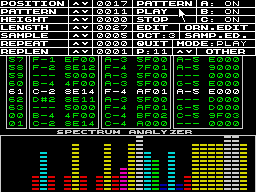
			<content type="html"><![CDATA[<p>So recently I bought an amstrad cpc for making AY tunes and I&#039;ve been happily messing with VortexTracker and doing a few tracks on it. But the bad thing about Vortex is that I can only work on my tracks at home.</p><p><a class="postimg" href="http://zxtunes.com/software/scr/024_1" title="http://zxtunes.com/software/scr/024_1" id="forum_image_97375708"><img src="http://zxtunes.com/software/scr/024_1" /></a></p><p>That&#039;s why I started to look up alternative ways to make ay songs and I found out a promising one but now I&#039;m a little bit blocked. What I&#039;ve been trying is to use a speccy emulator (Unreal Speccy for Android) and run Golden Disk&#039;s ProTracker, which is very similar to Vortex. </p><p>The thing is that I can&#039;t find any user manual or tutorial, and I only figured out a few controls, for example: I got how to move the cursor in the grid, mouse, delete, put notes and values on the grid, edit &#039;samples&#039; BUT once I click Play I don&#039;t know how to pause the whole thing.</p><p>Does anybody know if there&#039;s an user manual? Otherwise I would like to know how to stop/play the song/pattern and a few block functions like copy&amp;pasta.</p><p>Thanks ^w^!</p>]]></content>
			<author>
				<name><![CDATA[PaK-Zer0]]></name>
				<uri>https://chipmusic.org/PaK-Zer0</uri>
			</author>
			<updated>2014-07-14T09:12:11Z</updated>
			<id>https://chipmusic.org/forums/post/213135/#p213135</id>
		</entry>
</feed>