<?xml version="1.0" encoding="utf-8"?>
<feed xmlns="http://www.w3.org/2005/Atom">
	<title type="html"><![CDATA[ChipMusic.org - Nanoloop USB-Midi Adaptor Not Connecting]]></title>
	<link rel="self" href="https://chipmusic.org:80/forums/feed/atom/topic/15291/"/>
	<updated>2015-02-05T22:21:16Z</updated>
	<generator>PunBB</generator>
	<id>https://chipmusic.org/forums/topic/15291/nanoloop-usbmidi-adaptor-not-connecting/</id>
		<entry>
			<title type="html"><![CDATA[Re: Nanoloop USB-Midi Adaptor Not Connecting]]></title>
			<link rel="alternate" href="https://chipmusic.org/forums/post/225585/#p225585"/>
			<content type="html"><![CDATA[<p>I cant even get your message:<br />nanoloop MIDI adaptor found</p><p>I am trying to sync either nanoloop or LSDJ to ableton live and constantly getting the </p><p>error: no nanoloop MIDI adaptor found</p><p><img src="https://chipmusic.org/forums/img/smilies/sad.png" width="15" height="15" alt="sad" /></p>]]></content>
			<author>
				<name><![CDATA[JodyBigfoot]]></name>
				<uri>https://chipmusic.org/JodyBigfoot</uri>
			</author>
			<updated>2015-02-05T22:21:16Z</updated>
			<id>https://chipmusic.org/forums/post/225585/#p225585</id>
		</entry>
		<entry>
			<title type="html"><![CDATA[Re: Nanoloop USB-Midi Adaptor Not Connecting]]></title>
			<link rel="alternate" href="https://chipmusic.org/forums/post/224602/#p224602"/>
			<content type="html"><![CDATA[<p>Upon transferring files, I permanently corrupted one because I was stupid and accidentally skipped a couple directions... But the rest worked....</p>]]></content>
			<author>
				<name><![CDATA[Wholesome Family Music]]></name>
				<uri>https://chipmusic.org/Wholesome+Family+Music</uri>
			</author>
			<updated>2015-01-15T01:06:48Z</updated>
			<id>https://chipmusic.org/forums/post/224602/#p224602</id>
		</entry>
		<entry>
			<title type="html"><![CDATA[Re: Nanoloop USB-Midi Adaptor Not Connecting]]></title>
			<link rel="alternate" href="https://chipmusic.org/forums/post/224599/#p224599"/>
			<content type="html"><![CDATA[<p>Ok so I just want to say that after putting this off for awhile, I finally got it to work, and just successfully sent my first bank to the computer. I&#039;ll try to send it back to make sure it completely saved, but thanks for everyone&#039;s help with this! I don&#039;t know what I was doing wrong in the past lol <img src="https://chipmusic.org/forums/img/smilies/tongue.png" width="15" height="15" alt="tongue" /></p><p>EDIT: Just sent the file back to the Gameboy and it remained intact, and I re-sent it back to the computer. Now I&#039;ll finally have some space on my cart for new songs, thanks guys!</p>]]></content>
			<author>
				<name><![CDATA[Wholesome Family Music]]></name>
				<uri>https://chipmusic.org/Wholesome+Family+Music</uri>
			</author>
			<updated>2015-01-15T00:45:49Z</updated>
			<id>https://chipmusic.org/forums/post/224599/#p224599</id>
		</entry>
		<entry>
			<title type="html"><![CDATA[Re: Nanoloop USB-Midi Adaptor Not Connecting]]></title>
			<link rel="alternate" href="https://chipmusic.org/forums/post/220358/#p220358"/>
			<content type="html"><![CDATA[<p>i often struggle with similar data transfer situations.<br />it always works out when i manage to use the right adapter and secure a perfectly steady connection throughout the WHOLE process.<br />also make sure that the connection is perfect, already from early stages that you may consider less important.</p><p>so, basically, if you have the latest red adapter, a proper cable, plug them properly and not move them during the process, everything should work.</p>]]></content>
			<author>
				<name><![CDATA[the mist toggles]]></name>
				<uri>https://chipmusic.org/the+mist+toggles</uri>
			</author>
			<updated>2014-10-31T12:59:58Z</updated>
			<id>https://chipmusic.org/forums/post/220358/#p220358</id>
		</entry>
		<entry>
			<title type="html"><![CDATA[Re: Nanoloop USB-Midi Adaptor Not Connecting]]></title>
			<link rel="alternate" href="https://chipmusic.org/forums/post/220353/#p220353"/>
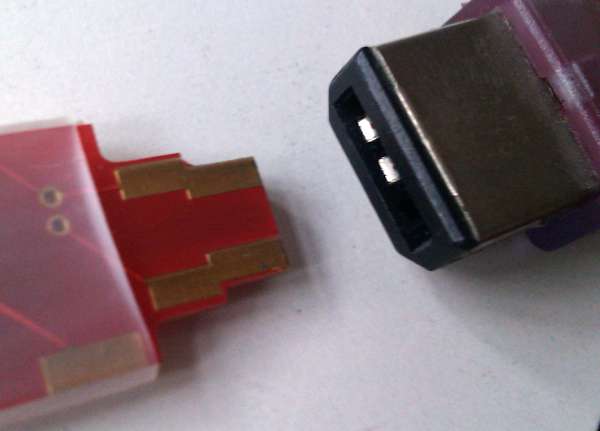
			<content type="html"><![CDATA[<p>if you get to the point where nlmidi says &quot;Ready to receive data.&quot; and then press A+B+UP on the Game Boy, nlmidi should start counting the received kilobytes and say &quot;1k saved&quot;. a second after the note shows up on the Game Boy, nlmidi would say &quot;...done&quot;.</p><p>if nlmidi does not count at all, no data are trnasferred and it&#039;s probably a connection problem. please make sure the adaptor is plugged in this way:<br /><a class="postimg" href="http://www.nanoloop.com/midi/nlmidi.jpg" title="http://www.nanoloop.com/midi/nlmidi.jpg" id="forum_image_96587801"><img src="http://www.nanoloop.com/midi/nlmidi.jpg" /></a></p>]]></content>
			<author>
				<name><![CDATA[oliver]]></name>
				<uri>https://chipmusic.org/oliver</uri>
			</author>
			<updated>2014-10-31T11:40:02Z</updated>
			<id>https://chipmusic.org/forums/post/220353/#p220353</id>
		</entry>
		<entry>
			<title type="html"><![CDATA[Re: Nanoloop USB-Midi Adaptor Not Connecting]]></title>
			<link rel="alternate" href="https://chipmusic.org/forums/post/220244/#p220244"/>
			<content type="html"><![CDATA[<p>I tried again, and I&#039;ve been waiting for about 45 minutes, I&#039;m still stuck at the music note, with no indication from nlmidi that it saved. Is there anything I can try doing? Should I keep waiting?</p>]]></content>
			<author>
				<name><![CDATA[Wholesome Family Music]]></name>
				<uri>https://chipmusic.org/Wholesome+Family+Music</uri>
			</author>
			<updated>2014-10-29T22:17:31Z</updated>
			<id>https://chipmusic.org/forums/post/220244/#p220244</id>
		</entry>
		<entry>
			<title type="html"><![CDATA[Re: Nanoloop USB-Midi Adaptor Not Connecting]]></title>
			<link rel="alternate" href="https://chipmusic.org/forums/post/220225/#p220225"/>
			<content type="html"><![CDATA[<div class="quotebox"><cite>egr wrote:</cite><blockquote><p>Probably not. It takes a lot longer than you would expect for data to be transmitted.&nbsp; Let it sit for a good 10 minutes or so and see if it completes.</p></blockquote></div><p>Oh ok. I was just being impatient then. <img src="https://chipmusic.org/forums/img/smilies/tongue.png" width="15" height="15" alt="tongue" /> thanks for your help!</p>]]></content>
			<author>
				<name><![CDATA[Wholesome Family Music]]></name>
				<uri>https://chipmusic.org/Wholesome+Family+Music</uri>
			</author>
			<updated>2014-10-29T19:41:35Z</updated>
			<id>https://chipmusic.org/forums/post/220225/#p220225</id>
		</entry>
		<entry>
			<title type="html"><![CDATA[Re: Nanoloop USB-Midi Adaptor Not Connecting]]></title>
			<link rel="alternate" href="https://chipmusic.org/forums/post/220193/#p220193"/>
			<content type="html"><![CDATA[<p>Probably not. It takes a lot longer than you would expect for data to be transmitted.&nbsp; Let it sit for a good 10 minutes or so and see if it completes.</p>]]></content>
			<author>
				<name><![CDATA[egr]]></name>
				<uri>https://chipmusic.org/egr</uri>
			</author>
			<updated>2014-10-29T12:01:58Z</updated>
			<id>https://chipmusic.org/forums/post/220193/#p220193</id>
		</entry>
		<entry>
			<title type="html"><![CDATA[Re: Nanoloop USB-Midi Adaptor Not Connecting]]></title>
			<link rel="alternate" href="https://chipmusic.org/forums/post/220151/#p220151"/>
			<content type="html"><![CDATA[<div class="quotebox"><cite>egr wrote:</cite><blockquote><p>I believe I&#039;ve had this exact problem.&nbsp; In my case, I was trying to execute the nlmidi program by double clicking or right click run etc instead of navigating to the file in the command line and then entering the commands to start the program.&nbsp; If that&#039;s not what you&#039;re doing then I apologize for implying that you&#039;re as dumb as I am.&nbsp; ;P</p></blockquote></div><p>Ok so I was doing the exact same thing, so thank you for pointing that out. <img src="https://chipmusic.org/forums/img/smilies/tongue.png" width="15" height="15" alt="tongue" /></p><p>I finally got the program to work and begin the process, however, when I transfer the file and the little music note shows up on the Gameboy screen (in the top left corner), from that point it stops working. &quot;Saved&quot; never shows up in the nlmidi program, and the file is nowhere on my computer and is still on my Gameboy. Am I doing anything wrong here?</p>]]></content>
			<author>
				<name><![CDATA[Wholesome Family Music]]></name>
				<uri>https://chipmusic.org/Wholesome+Family+Music</uri>
			</author>
			<updated>2014-10-28T23:43:37Z</updated>
			<id>https://chipmusic.org/forums/post/220151/#p220151</id>
		</entry>
		<entry>
			<title type="html"><![CDATA[Re: Nanoloop USB-Midi Adaptor Not Connecting]]></title>
			<link rel="alternate" href="https://chipmusic.org/forums/post/220146/#p220146"/>
			<content type="html"><![CDATA[<p>I believe I&#039;ve had this exact problem.&nbsp; In my case, I was trying to execute the nlmidi program by double clicking or right click run etc instead of navigating to the file in the command line and then entering the commands to start the program.&nbsp; If that&#039;s not what you&#039;re doing then I apologize for implying that you&#039;re as dumb as I am.&nbsp; ;P</p>]]></content>
			<author>
				<name><![CDATA[egr]]></name>
				<uri>https://chipmusic.org/egr</uri>
			</author>
			<updated>2014-10-28T22:49:27Z</updated>
			<id>https://chipmusic.org/forums/post/220146/#p220146</id>
		</entry>
		<entry>
			<title type="html"><![CDATA[Re: Nanoloop USB-Midi Adaptor Not Connecting]]></title>
			<link rel="alternate" href="https://chipmusic.org/forums/post/220142/#p220142"/>
			<content type="html"><![CDATA[<div class="quotebox"><cite>oliver wrote:</cite><blockquote><p>Parameters are passed along with the command, e.g. you type</p><p>./nlmidi02 -receive myfirstbank.nl1</p><p>and then press enter.</p><p>Communication is one-way, data are sent/received blindly and there is no error-checking. Steps for saving / loading data have to be performed in the exact order as described.<br />It is also highly recommended to do a &quot;round-trip&quot; and load a saved bank back to an other bank on the cart. This is currently the only way to confirm that data were transferred correctly.</p></blockquote></div><p>Thanks for responding! I tried again a few times today, making sure the steps were followed in the exact order as on the website, but I still got the same message that I posted earlier on this thread. And, like I said earlier, I still can&#039;t even type in the terminal at this point because it automatically ends the process. The Audio MIDI settings on my computer haven&#039;t changed, and there doesn&#039;t seem to be a way to change anything. It claims when the cable is plugged in that Nanoloop MIDI is online, but there aren&#039;t any settings to change. Hopefully I&#039;m not being confusing or too vague, but this is all that I am able to tell you.</p><p>Sorry for yet another bump, I&#039;ve been preoccupied with other stuff and haven&#039;t been messing with this until now.</p>]]></content>
			<author>
				<name><![CDATA[Wholesome Family Music]]></name>
				<uri>https://chipmusic.org/Wholesome+Family+Music</uri>
			</author>
			<updated>2014-10-28T22:09:45Z</updated>
			<id>https://chipmusic.org/forums/post/220142/#p220142</id>
		</entry>
		<entry>
			<title type="html"><![CDATA[Re: Nanoloop USB-Midi Adaptor Not Connecting]]></title>
			<link rel="alternate" href="https://chipmusic.org/forums/post/218555/#p218555"/>
			<content type="html"><![CDATA[<p>Parameters are passed along with the command, e.g. you type</p><p>./nlmidi02 -receive myfirstbank.nl1</p><p>and then press enter.</p><p>Communication is one-way, data are sent/received blindly and there is no error-checking. Steps for saving / loading data have to be performed in the exact order as described.<br />It is also highly recommended to do a &quot;round-trip&quot; and load a saved bank back to an other bank on the cart. This is currently the only way to confirm that data were transferred correctly.</p>]]></content>
			<author>
				<name><![CDATA[oliver]]></name>
				<uri>https://chipmusic.org/oliver</uri>
			</author>
			<updated>2014-10-06T07:39:15Z</updated>
			<id>https://chipmusic.org/forums/post/218555/#p218555</id>
		</entry>
		<entry>
			<title type="html"><![CDATA[Re: Nanoloop USB-Midi Adaptor Not Connecting]]></title>
			<link rel="alternate" href="https://chipmusic.org/forums/post/218511/#p218511"/>
			<content type="html"><![CDATA[<p>Sorry, I feel really lame for bumping this, but does anyone know how to get my computer to fully recognize Nanoloop? I haven&#039;t been able to get it to work , and the MIDI settings don&#039;t seem to have changed.</p>]]></content>
			<author>
				<name><![CDATA[Wholesome Family Music]]></name>
				<uri>https://chipmusic.org/Wholesome+Family+Music</uri>
			</author>
			<updated>2014-10-05T14:04:44Z</updated>
			<id>https://chipmusic.org/forums/post/218511/#p218511</id>
		</entry>
		<entry>
			<title type="html"><![CDATA[Re: Nanoloop USB-Midi Adaptor Not Connecting]]></title>
			<link rel="alternate" href="https://chipmusic.org/forums/post/218020/#p218020"/>
			<content type="html"><![CDATA[<p><a class="postimg" href="http://i60.tinypic.com/2vv84cy.png" title="screenshot" id="forum_image_67735644"><img src="http://i60.tinypic.com/2vv84cy.png" /></a></p><p>Here&#039;s the screenshot. The Gameboy being plugged into the computer was messing with my computer&#039;s functioning properly for some reason. Sorry for the crappy quality (I had to settle for Tinypic, ugh).</p>]]></content>
			<author>
				<name><![CDATA[Wholesome Family Music]]></name>
				<uri>https://chipmusic.org/Wholesome+Family+Music</uri>
			</author>
			<updated>2014-09-28T13:47:36Z</updated>
			<id>https://chipmusic.org/forums/post/218020/#p218020</id>
		</entry>
		<entry>
			<title type="html"><![CDATA[Re: Nanoloop USB-Midi Adaptor Not Connecting]]></title>
			<link rel="alternate" href="https://chipmusic.org/forums/post/218019/#p218019"/>
			<content type="html"><![CDATA[<div class="quotebox"><cite>nitro2k01 wrote:</cite><blockquote><p>That message means the adapter itself was not recognized as being found. It has nothing to do with the link cable or the Gameboy at the other end. Go into OSX&#039;s audio and MIDI settings panel and report what you see there. You might want to post a screenshot of the audio MIDI settings window. (Shift+Apple+4 then space then select a window with the mouse, if I recall correctly.)</p></blockquote></div><p>Thanks for responding! I restarted the process today, got the same message, and then opened up the MIDI window.</p><p>This is going to sound incredibly stupid, but for some reason the computer is not taking my screenshots (yes, I pressed the right buttons... It would show the window with the pixel numbers but not save the pictures anywhere). So in the meantime, the MIDI window DOES recognize Nanoloop MIDI in the MIDI studio, and when you click on it, it just lists the ports (Nanoloop), the name, and manufacturer. I can&#039;t change anything in the window, though. All it says is that Nanoloop MIDI exists, basically. If there&#039;s anything else I can do, let me know. I&#039;ll send screenshots when my computer allows me to.</p>]]></content>
			<author>
				<name><![CDATA[Wholesome Family Music]]></name>
				<uri>https://chipmusic.org/Wholesome+Family+Music</uri>
			</author>
			<updated>2014-09-28T13:28:18Z</updated>
			<id>https://chipmusic.org/forums/post/218019/#p218019</id>
		</entry>
</feed>
