<?xml version="1.0" encoding="utf-8"?>
<feed xmlns="http://www.w3.org/2005/Atom">
	<title type="html"><![CDATA[ChipMusic.org - Marabu tracker / ORCA visual programming  environment]]></title>
	<link rel="self" href="https://chipmusic.org:80/forums/feed/atom/topic/24317/"/>
	<updated>2021-07-24T13:19:39Z</updated>
	<generator>PunBB</generator>
	<id>https://chipmusic.org/forums/topic/24317/marabu-tracker-orca-visual-programming-environment/</id>
		<entry>
			<title type="html"><![CDATA[Re: Marabu tracker / ORCA visual programming  environment]]></title>
			<link rel="alternate" href="https://chipmusic.org/forums/post/265281/#p265281"/>
			<content type="html"><![CDATA[<p>For a fairly comprehensive, interactive, and up-to-date tutorial on ORCA&#039;s usage, see here: <a href="https://metasyn.github.io/learn-orca/" target="_blank">https://metasyn.github.io/learn-orca/</a></p><p>For a more lightweight and portable version for Linux (including RPi, etc.), check out ORCA-C: <a href="https://github.com/hundredrabbits/Orca-c" target="_blank">https://github.com/hundredrabbits/Orca-c</a></p><p>For the latest around ORCA&#039;s development, particularly most lately around its development on and in relation to the ultra-portable virtual computer <a href="https://100r.co/site/uxn.html" target="_blank">Uxn</a> (which just so happens to be able to run on the DS, GBA, and PSP, apart from the PC and among much else), see here:<br /><a href="https://llllllll.co/t/orca-livecoding-tool/17689/2?u=rmblrx" target="_blank">https://llllllll.co/t/orca-livecoding-t &#133; 2?u=rmblrx</a><br /><a href="https://llllllll.co/t/uxn-virtual-computer/46103?u=rmblrx" target="_blank">https://llllllll.co/t/uxn-virtual-compu &#133; 3?u=rmblrx</a></p><p>(also, here&#039;s a little something I was working on using ORCA with a DMG and in parallel with RetroPlug: <a href="https://www.instagram.com/p/CP9H0D8hzZI" target="_blank">https://www.instagram.com/p/CP9H0D8hzZI</a>)</p>]]></content>
			<author>
				<name><![CDATA[RMBLRX]]></name>
				<uri>https://chipmusic.org/RMBLRX</uri>
			</author>
			<updated>2021-07-24T13:19:39Z</updated>
			<id>https://chipmusic.org/forums/post/265281/#p265281</id>
		</entry>
		<entry>
			<title type="html"><![CDATA[Re: Marabu tracker / ORCA visual programming  environment]]></title>
			<link rel="alternate" href="https://chipmusic.org/forums/post/265280/#p265280"/>
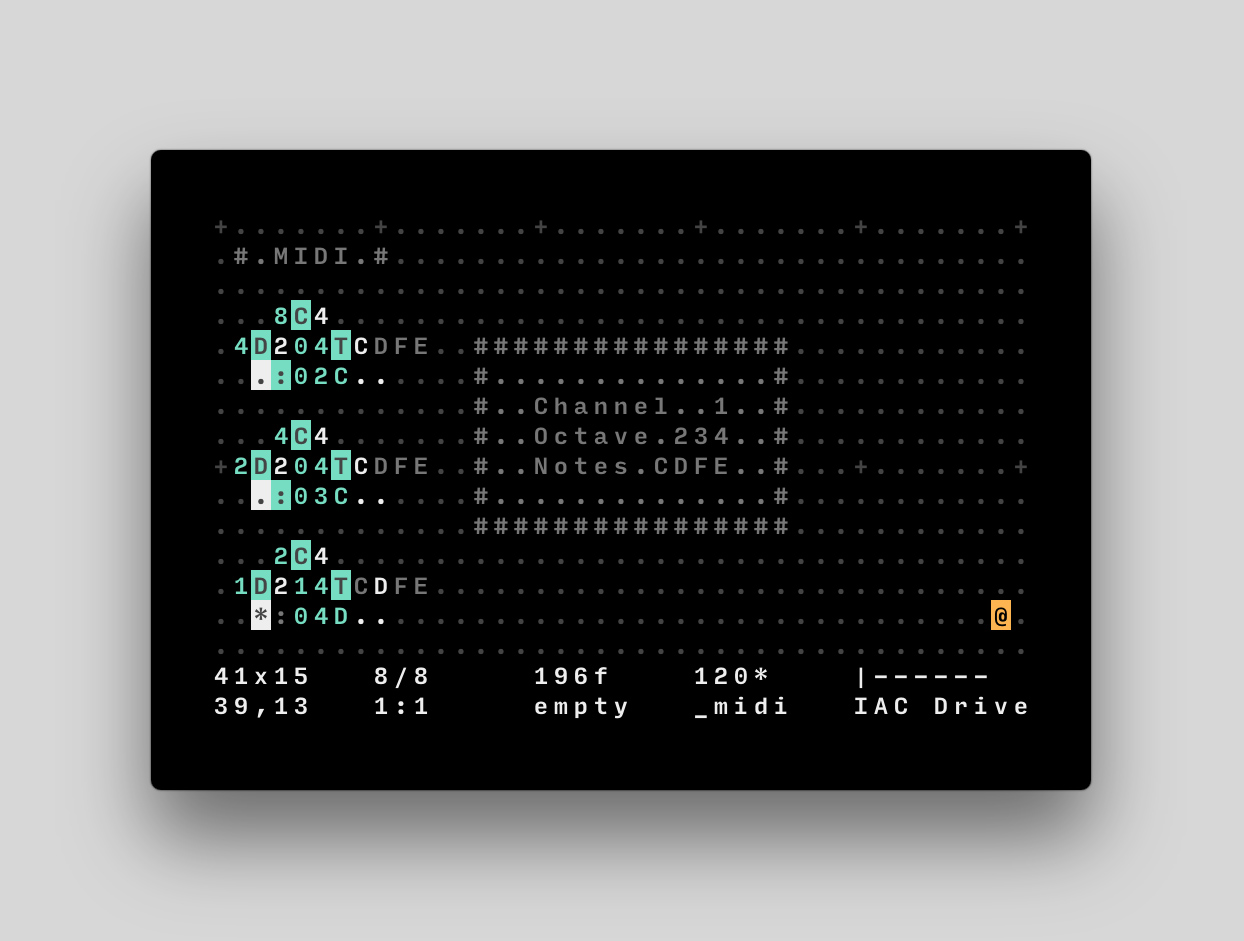
			<content type="html"><![CDATA[<p>OK. I&#039;d like to share some tips.<br />_______________________________________</p><p>&nbsp; &nbsp; &nbsp; &nbsp; &nbsp; &nbsp; &nbsp; &nbsp; &nbsp; &nbsp; HOW TO <strong>SET UP</strong> ORCA<br />&nbsp; &nbsp; &nbsp; &nbsp; &nbsp; &nbsp; &nbsp; &nbsp; &nbsp; &nbsp; &nbsp; &nbsp; <strong>FOR BEGINNERS</strong><br />_______________________________________</p><p>It took me a while to figure some things, so, This could help somebody maybee..</p><p>_______________________________________</p><p>&nbsp; &nbsp; &nbsp; &nbsp; &nbsp; &nbsp; &nbsp; &nbsp; &nbsp; &nbsp; &nbsp; &nbsp; &nbsp; &nbsp; &nbsp; &nbsp; &nbsp; ORCA&nbsp; &nbsp; &nbsp; &nbsp; &nbsp; &nbsp; &nbsp; &nbsp; &nbsp; &nbsp; &nbsp; &nbsp; &nbsp; &nbsp; &nbsp; &nbsp; &nbsp; &nbsp; &nbsp; &nbsp; &nbsp; &nbsp;<br />_______________________________________</p><p>You can download ORCA here (bottom of the page) for different platforms:<br /><a href="https://wiki.xxiivv.com/site/orca.html" target="_blank">https://wiki.xxiivv.com/site/orca.html</a><br /><a href="https://github.com/Hundredrabbits/Orca" target="_blank">https://github.com/Hundredrabbits/Orca</a><br />(top of the page)<br />so:<br />Standalone versions grab here:<br /><a href="https://hundredrabbits.itch.io/orca" target="_blank">https://hundredrabbits.itch.io/orca</a><br />For Win it&#039;s available only for 64bit systems<br />For 32bit system, you have to use browser version:<br /><a href="https://hundredrabbits.github.io/Orca/" target="_blank">https://hundredrabbits.github.io/Orca/</a><br />browser version is kind of tricky to run on Firefox (I didn&#039;t manage it to run), but it runs on Opera and should on Chrome and Safari... (can&#039;t find link to supported browsers and tutorial how to run it on firefox, but it&#039;s floating around)<br />ORCA doesn&#039;t run on WinXP on web browser for me. Browsers stopped to support WinXP while ago unfortunatelly.</p><p>_______________________________________</p><p>&nbsp; &nbsp; &nbsp; &nbsp; &nbsp; &nbsp; &nbsp; &nbsp; &nbsp; &nbsp; &nbsp; &nbsp; &nbsp; &nbsp; &nbsp; &nbsp; &nbsp; &nbsp;MIDI&nbsp; &nbsp; &nbsp; &nbsp; &nbsp; &nbsp; &nbsp; &nbsp; &nbsp; &nbsp; &nbsp; &nbsp; &nbsp; &nbsp; &nbsp; &nbsp; &nbsp; &nbsp; &nbsp; &nbsp; &nbsp; <br />_______________________________________</p><p>To run ORCA as a midi sequencer, you&#039;ll also need some virtual midi port ORCA could connect to...<br />It should connect to USB-Midi devices directly, but I didn&#039;t test it and I don&#039;t have any multitimbral Midi synthesizer to try it...<br />So you have to use some virtual midi cable / port<br />You can grab LoopMidi here:<br /><a href="http://www.tobias-erichsen.de/software/loopmidi.html" target="_blank">http://www.tobias-erichsen.de/software/loopmidi.html</a><br />run loopMidi first, create new port (+ button on setup page), than run ORCA<br />Orca should connect to loopMidi port automatically<br />(or CTRL + &gt; to circle through midi out ports of ORCA)<br />(CTRL + &lt; circle through midi in ports of&nbsp; ORCA - it should slave to incoming midi clock from midi in port)<br />alternative to loopMidi could be MidiYoke<br /><a href="http://www.midiox.com/index.htm?http://www.midiox.com/myoke.htm" target="_blank">http://www.midiox.com/index.htm?http:// &#133; /myoke.htm</a></p><p>Now you can run simple ORCA command</p><p>.D.<br />..:03C</p><p>: for midi<br />0 for midi channel (0 in ORCA is midi channel 1)<br />3 for octave<br />C for C note</p><p>on loopMidi you should see some progress</p><p>_______________________________________</p><p>&nbsp; &nbsp; &nbsp; &nbsp; &nbsp; &nbsp; &nbsp; &nbsp; &nbsp; &nbsp; &nbsp; &nbsp; &nbsp; &nbsp; &nbsp; &nbsp; &nbsp; SOUND&nbsp; &nbsp; &nbsp; &nbsp; &nbsp; &nbsp; &nbsp; &nbsp; &nbsp; &nbsp; &nbsp; &nbsp; &nbsp; &nbsp; &nbsp; &nbsp; &nbsp; &nbsp; &nbsp; &nbsp; &nbsp; <br />_______________________________________</p><p>sure, there is no sound<br />you have to connect loopMidi port to some sound source<br />You can use DAW<br />You can use instruments dedicated to work with ORCA<br />Pilot (synth):<br /><a href="https://hundredrabbits.itch.io/pilot" target="_blank">https://hundredrabbits.itch.io/pilot</a><br />Cassetter (sampler):<br /><a href="https://person0b.itch.io/cassetter" target="_blank">https://person0b.itch.io/cassetter</a><br />Both for 64bit systems, so doesn&#039;t work for me... shame...<br />I don&#039;t use DAW, so here are some other tips:<br />You&#039;ll need something that can map different instruments to different midi channels ORCA is sending<br />You could use some VST instruments.<br />I found Shortcircuit sampler working nice, it has user friendly interface and clearly understandable layout:<br /><a href="https://vemberaudio.se/shortcircuit/" target="_blank">https://vemberaudio.se/shortcircuit/</a><br /><a href="https://web.archive.org/web/20180722062514/http://www.vemberaudio.se/pd/shortcircuit/shortcircuit-1_1_2.exe" target="_blank">https://web.archive.org/web/20180722062 &#133; -1_1_2.exe</a><br />To run VST you have to use some VST client:<br />MiniHost by Tobybear:<br /><a href="https://www.kvraudio.com/product/minihost_by_tobybear" target="_blank">https://www.kvraudio.com/product/minihost_by_tobybear</a><br /><a href="https://web.archive.org/web/20120825153159/http://www.phreque.com/tobybear/minihost.zip" target="_blank">https://web.archive.org/web/20120825153 &#133; nihost.zip</a><br />or VstHost<br /><a href="https://www.hermannseib.com/english/vsthost.htm" target="_blank">https://www.hermannseib.com/english/vsthost.htm</a><br />You&#039;ll also need Asio4all low latency audio driver:<br /><a href="https://www.asio4all.org" target="_blank">https://www.asio4all.org</a></p><p>OK<br />ORCA &gt;&gt; loopMidi &gt;&gt; VST host (running VST instrument) &gt;&gt; AsioDriver</p><p>_______________________________________</p><p>&nbsp; &nbsp; &nbsp; &nbsp; &nbsp; &nbsp; &nbsp; &nbsp; &nbsp; &nbsp; &nbsp; &nbsp; &nbsp; &nbsp; &nbsp; SOUNDFONT&nbsp; &nbsp; &nbsp; &nbsp; &nbsp; &nbsp; &nbsp; &nbsp; &nbsp; &nbsp; &nbsp; &nbsp; &nbsp; &nbsp; &nbsp; &nbsp; &nbsp; &nbsp; &nbsp; &nbsp; &nbsp;<br />_______________________________________</p><p>But I had some idea.. to use some FM sounds with ORCA<br />...<br />Preciselly i&#039;d like to use OPL3 soundfont<br /><a href="https://musical-artifacts.com/artifacts/15" target="_blank">https://musical-artifacts.com/artifacts/15</a><br />Shortcircuit sampler can use soundfonts, but in kind of hard way...<br />And I&#039;d like to use soundfont for my regular onboard windows Midi device<br />(yes, there is still that awkward sounding midi device built in windows7...)<br />OK.<br />If you&#039;d like to use soundfont this way, you could use:<br />Bass midi driver:<br /><a href="https://web.archive.org/web/20130126063542/https://kode54.net/bassmididrv/" target="_blank">https://web.archive.org/web/20130126063 &#133; ssmididrv/</a><br />alternative should be Coolsoft VirtualMIDISynth<br /><a href="https://coolsoft.altervista.org/en/virtualmidisynth#download" target="_blank">https://coolsoft.altervista.org/en/virt &#133; h#download</a><br />(or VST host and soundfont player - sfz):<br /><a href="https://web.archive.org/web/20060516203430/http://www.rgcaudio.com/downloads/freeware/sfz197.exe" target="_blank">https://web.archive.org/web/20060516203 &#133; sfz197.exe</a><br />for Bass midi driver - install, it should create folder on startup menu<br />go to bassmidi driver configuration<br />Soundfont port A - Add - OPL-3_FM_128M - Apply<br />you&#039;re good to go<br />Now you can run ORCA &gt;&gt; BassMidiDriver (port A)<br />Channel 10 (number 9 in ORCA) triggers drum sounds<br />but other channels triggers same sound...</p><p>_______________________________________</p><p>&nbsp; &nbsp; &nbsp; &nbsp; &nbsp; &nbsp; &nbsp; &nbsp; &nbsp; &nbsp; &nbsp; &nbsp; &nbsp; &nbsp; &nbsp; MIDI FILTER&nbsp; &nbsp; &nbsp; &nbsp; &nbsp; &nbsp; &nbsp; &nbsp; &nbsp; &nbsp; &nbsp; &nbsp; &nbsp; &nbsp; &nbsp; &nbsp; &nbsp; &nbsp; &nbsp; &nbsp; <br />_______________________________________</p><p>Now you have to assign different sounds of soundfont to different midi channels...<br />you&#039;ll need Midi-OX<br /><a href="http://www.midiox.com/index.htm" target="_blank">http://www.midiox.com/index.htm</a><br />alternative is midiTools<br /><a href="https://mountainutilities.eu/miditools" target="_blank">https://mountainutilities.eu/miditools</a><br />so, in Midi-OX:<br />set up Options-Midi Devices<br />Midi input to: loopMidi<br />Midi output to: BassMidi (port A)<br />In ORCA set up Midi out to loopMidi.<br />Now you are running:<br />ORCA &gt;&gt; loopMidi &gt;&gt; Midi-OX &gt;&gt; BassMidi<br />in Midi-OX open View-Midi Status<br />now you can click to Patch column for single channel and change instrument (patch) for that Channel<br />Change channels in ORCA and map your patches in Midi-OX<br />Leave midi channel 10 in Midi-OX (9 in ORCA ) column empty, it&#039;s for drums<br />Now you can right-click to midi Status window and SAVE your snapshot<br />later you can load it to this window and SEND to midi out</p><p>EDIT:</p><p>you can assign patches (different instruments) from soundfont directly from ORCA:<br />just bang ORCA command:<br />.D.<br />.$pg:1;;;63</p><p>wich means:<br />$pg:1;000;000;063 (ORCA will ignore these 0)<br />wich means:<br />$ send orca command - program - : midi channel 2 (1 in ORCA) ; 000 Bank Select MSB – Most Significant Byte ; 000 Bank Select LSB – Least Significant Byte ( = Bank 0 )&nbsp; ; patch 063</p><p>thus you can connect ORCA &gt;&gt; Bass MidiDriver and skip this Midi Filtering step</p><p>_______________________________________</p><p>&nbsp; &nbsp; &nbsp; &nbsp; &nbsp; &nbsp; &nbsp; &nbsp; &nbsp; &nbsp; &nbsp; &nbsp; &nbsp; &nbsp; &nbsp; &nbsp; &nbsp; END&nbsp; &nbsp; &nbsp; &nbsp; &nbsp; &nbsp; &nbsp; &nbsp; &nbsp; &nbsp; &nbsp; &nbsp; &nbsp; &nbsp; &nbsp; &nbsp; &nbsp; &nbsp; &nbsp; &nbsp; <br />_______________________________________</p><p>We&#039;re done<br />there are some shortcuts in ORCA you&#039;d like to know:<br />CTRL + S (save - files need to have .orca extension to open in ORCA later)<br />CTRL + O (open - it took a while to open dialog window for me, but it works)<br />R_ALT + &lt; or &gt; (change BPM)<br />CTRL + &gt;&nbsp; (Midi out port)<br />CTRL + &lt; (Midi in port)</p><p>usefull links:<br /><a href="https://anapan.525lines.moe/oldscardemu.htm" target="_blank">https://anapan.525lines.moe/oldscardemu.htm</a><br /><a href="https://www.donyaquick.com/midi-on-windows/" target="_blank">https://www.donyaquick.com/midi-on-windows/</a></p>]]></content>
			<author>
				<name><![CDATA[ryba]]></name>
				<uri>https://chipmusic.org/ryba</uri>
			</author>
			<updated>2021-07-24T11:49:51Z</updated>
			<id>https://chipmusic.org/forums/post/265280/#p265280</id>
		</entry>
		<entry>
			<title type="html"><![CDATA[Re: Marabu tracker / ORCA visual programming  environment]]></title>
			<link rel="alternate" href="https://chipmusic.org/forums/post/262336/#p262336"/>
			<content type="html"><![CDATA[<p>ORCΛ is far and away my favorite software sequencer. I&#039;ve been wanting to do a track with that and mGB for a little while now. I&#039;ve done <a href="https://www.instagram.com/p/BzC9US6DcuQ/?igshid=12gdzk3dwrq8e" target="_blank">some noodling to that effect</a> already. One of the first tracks I did with ORCΛ was for the DAFM Sega Genesis-based synth (though mine uses YM3438):</p><p><div class="embed_video"><iframe width="560" height="340" src="https://www.youtube.com/embed/RhihyYxa9VA" frameborder="0" webkitallowfullscreen mozallowfullscreen allowfullscreen></iframe></div></p><p>I was instantly enthralled by ORCΛ&#039;s concept, but I wasn&#039;t sure I could make the sort of tracks I had in mind, based on seeing it&#039;s typically used (frankly, in a far less boring way than how I intended to use). It did, however, prove versatile enough for me to cobble together some machinery by which to compose and perform in a way that didn&#039;t require too much livecoding or demand for accurate timing in cueing sequences. I&#039;m not sure that I&#039;ll be doing so much composition with it, going forward, but I&#039;ll definitely be using it to sketch sequences to be used in composition or for producing more generative pieces.</p>]]></content>
			<author>
				<name><![CDATA[RMBLRX]]></name>
				<uri>https://chipmusic.org/RMBLRX</uri>
			</author>
			<updated>2019-08-17T20:12:38Z</updated>
			<id>https://chipmusic.org/forums/post/262336/#p262336</id>
		</entry>
		<entry>
			<title type="html"><![CDATA[Re: Marabu tracker / ORCA visual programming  environment]]></title>
			<link rel="alternate" href="https://chipmusic.org/forums/post/261996/#p261996"/>
			<content type="html"><![CDATA[<p>Looks like the tracker Aliceffekt did 1 or 2 years ago !<br />Edit: Just saw the patreon page and it is indeed what I was talking about ! <img src="https://chipmusic.org/forums/img/smilies/smile.png" width="15" height="15" alt="smile" /></p>]]></content>
			<author>
				<name><![CDATA[XyNo]]></name>
				<uri>https://chipmusic.org/XyNo</uri>
			</author>
			<updated>2019-05-07T11:39:44Z</updated>
			<id>https://chipmusic.org/forums/post/261996/#p261996</id>
		</entry>
		<entry>
			<title type="html"><![CDATA[Re: Marabu tracker / ORCA visual programming  environment]]></title>
			<link rel="alternate" href="https://chipmusic.org/forums/post/261994/#p261994"/>
			<content type="html"><![CDATA[<p>Agreed, ORCA is a very cool project.</p>]]></content>
			<author>
				<name><![CDATA[irrlichtproject]]></name>
				<uri>https://chipmusic.org/irrlichtproject</uri>
			</author>
			<updated>2019-05-06T13:59:58Z</updated>
			<id>https://chipmusic.org/forums/post/261994/#p261994</id>
		</entry>
		<entry>
			<title type="html"><![CDATA[Re: Marabu tracker / ORCA visual programming  environment]]></title>
			<link rel="alternate" href="https://chipmusic.org/forums/post/261993/#p261993"/>
			<content type="html"><![CDATA[<p>No idea. It does say that it&#039;s based on Soundbox, but I&#039;ve never used one or the other so I can&#039;t say. I recently got a bit hooked on ORCA by the same developer (<a href="https://hundredrabbits.itch.io/orca" target="_blank">https://hundredrabbits.itch.io/orca</a>) which I can totally recemmend!<br />While browsing their repos I found this and thought it might be of intertest to the tracker-loving community here.</p>]]></content>
			<author>
				<name><![CDATA[rumpelfilter]]></name>
				<uri>https://chipmusic.org/rumpelfilter</uri>
			</author>
			<updated>2019-05-06T08:00:14Z</updated>
			<id>https://chipmusic.org/forums/post/261993/#p261993</id>
		</entry>
		<entry>
			<title type="html"><![CDATA[Re: Marabu tracker / ORCA visual programming  environment]]></title>
			<link rel="alternate" href="https://chipmusic.org/forums/post/261992/#p261992"/>
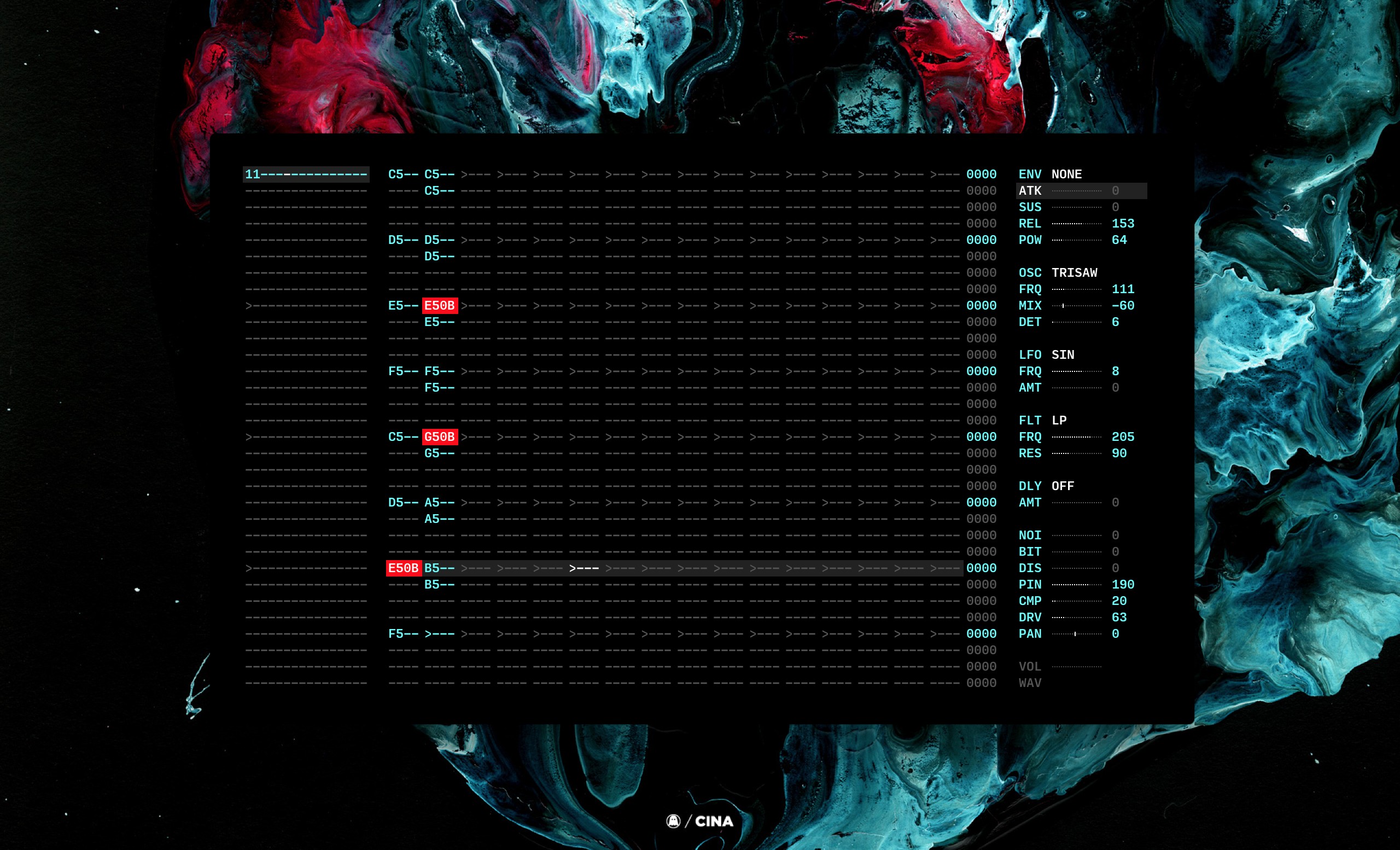
			<content type="html"><![CDATA[<p>Hmm, isn&#039;t this just a standalone version of Soundbox, with a different (admittedly much better) UI, and Javascript export stripped out for whatever reason? I&#039;d say just use <a href="http://sb.bitsnbites.eu/" target="_blank">the original</a> and make some music for 4k intros with it.</p>]]></content>
			<author>
				<name><![CDATA[irrlichtproject]]></name>
				<uri>https://chipmusic.org/irrlichtproject</uri>
			</author>
			<updated>2019-05-05T18:05:13Z</updated>
			<id>https://chipmusic.org/forums/post/261992/#p261992</id>
		</entry>
		<entry>
			<title type="html"><![CDATA[Marabu tracker / ORCA visual programming  environment]]></title>
			<link rel="alternate" href="https://chipmusic.org/forums/post/261987/#p261987"/>
			<content type="html"><![CDATA[<p><a class="postimg" href="https://raw.githubusercontent.com/hundredrabbits/Marabu/master/PREVIEW.jpg" title="https://raw.githubusercontent.com/hundredrabbits/Marabu/master/PREVIEW.jpg" id="forum_image_81118166"><img src="https://raw.githubusercontent.com/hundredrabbits/Marabu/master/PREVIEW.jpg" /></a></p><p>Just found this on the web, figures some of your might find it interesting:<br /><a href="https://github.com/hundredrabbits/Marabu" target="_blank">https://github.com/hundredrabbits/Marabu</a><br />binaries here:<br /><a href="https://hundredrabbits.itch.io/marabu" target="_blank">https://hundredrabbits.itch.io/marabu</a></p><p>They also make a generative music environment called ORCA, which seems pretty interesting.</p><p><a href="https://hundredrabbits.itch.io/orca" target="_blank">https://hundredrabbits.itch.io/orca</a></p><p><a class="postimg" href="https://raw.githubusercontent.com/hundredrabbits/Orca/master/resources/preview.jpg" title="https://raw.githubusercontent.com/hundredrabbits/Orca/master/resources/preview.jpg" id="forum_image_29338616"><img src="https://raw.githubusercontent.com/hundredrabbits/Orca/master/resources/preview.jpg" /></a></p>]]></content>
			<author>
				<name><![CDATA[rumpelfilter]]></name>
				<uri>https://chipmusic.org/rumpelfilter</uri>
			</author>
			<updated>2019-05-03T13:12:29Z</updated>
			<id>https://chipmusic.org/forums/post/261987/#p261987</id>
		</entry>
</feed>