<?xml version="1.0" encoding="utf-8"?>
<feed xmlns="http://www.w3.org/2005/Atom">
	<title type="html"><![CDATA[ChipMusic.org - Arduinoboy Teensy Trouble receiving midi message]]></title>
	<link rel="self" href="https://chipmusic.org:80/forums/feed/atom/topic/24714/"/>
	<updated>2020-10-20T21:50:08Z</updated>
	<generator>PunBB</generator>
	<id>https://chipmusic.org/forums/topic/24714/arduinoboy-teensy-trouble-receiving-midi-message/</id>
		<entry>
			<title type="html"><![CDATA[Re: Arduinoboy Teensy Trouble receiving midi message]]></title>
			<link rel="alternate" href="https://chipmusic.org/forums/post/264301/#p264301"/>
			<content type="html"><![CDATA[<p>It was the settings in mGB! I didn&#039;t really know what they should be set to but i moved the first wave option to the right a bit and it worked!!</p><p>Thanks for your help everybody</p><p><div class="embed_video"><iframe width="560" height="340" src="https://www.youtube.com/embed/sg_bPKr1Jus" frameborder="0" webkitallowfullscreen mozallowfullscreen allowfullscreen></iframe></div></p>]]></content>
			<author>
				<name><![CDATA[richy486]]></name>
				<uri>https://chipmusic.org/richy486</uri>
			</author>
			<updated>2020-10-20T21:50:08Z</updated>
			<id>https://chipmusic.org/forums/post/264301/#p264301</id>
		</entry>
		<entry>
			<title type="html"><![CDATA[Re: Arduinoboy Teensy Trouble receiving midi message]]></title>
			<link rel="alternate" href="https://chipmusic.org/forums/post/264300/#p264300"/>
			<content type="html"><![CDATA[<p>I&#039;m seeing activity on the oscilloscope on the &quot;Teeny 17 - link pin 2-SIN (orange)&quot; when i play any notes. <a class="postimg" href="https://i.imgur.com/FtMjxtP.jpg" title="https://i.imgur.com/FtMjxtP.jpg" id="forum_image_27194134"><img src="https://i.imgur.com/FtMjxtP.jpg" /></a><br />I also noticed that the little arrow above each channel in mGB is showing up when I play notes, so messages are getting through to the gameboy but no sounds, is there something wrong with how mGB is setup? <a class="postimg" href="https://i.imgur.com/FmPuDBs.jpg" title="https://i.imgur.com/FmPuDBs.jpg" id="forum_image_34016583"><img src="https://i.imgur.com/FmPuDBs.jpg" /></a></p><p>Tried playing C-2 to C8 but still no sound.</p>]]></content>
			<author>
				<name><![CDATA[richy486]]></name>
				<uri>https://chipmusic.org/richy486</uri>
			</author>
			<updated>2020-10-20T21:41:05Z</updated>
			<id>https://chipmusic.org/forums/post/264300/#p264300</id>
		</entry>
		<entry>
			<title type="html"><![CDATA[Re: Arduinoboy Teensy Trouble receiving midi message]]></title>
			<link rel="alternate" href="https://chipmusic.org/forums/post/264299/#p264299"/>
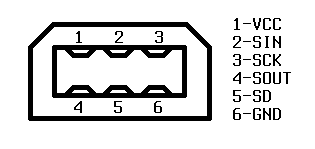
			<content type="html"><![CDATA[<p>Thanks for keeping this thread going.<br />I haven&#039;t got it completely working but got to where perspectiveshifting where the arduinoboy receives the midi messages, the LEDs light up, but the gameboy doesn&#039;t play any sounds.</p><p>- I started again on the breadboard, is there anything obvious that stands out? <a class="postimg" href="https://i.imgur.com/VXaKNjA.jpg" title="https://i.imgur.com/VXaKNjA.jpg" id="forum_image_15741805"><img src="https://i.imgur.com/VXaKNjA.jpg" /></a><br />- I used CatSkull&#039;s unmodified code: <a href="https://github.com/catskull/Arduinoboy" target="_blank">https://github.com/catskull/Arduinoboy</a> currently at <a href="https://github.com/catskull/Arduinoboy/commit/9a3ed0c6c26e92fc834e14b6cde833cddb8f5dc7" target="_blank">9a3ed0c</a>.<br />- I&#039;m also powering the teensy with 5v from the gameboy itself so I&#039;ve cut the USB power from the VCC, i thought this might have been an issue but the teensy is receiving midi. I also can see the device on my mac in the MIDI Studio app and can see messages coming from Live to <a href="http://www.snoize.com/MIDIMonitor/" target="_blank">Midi Monitor</a>.<br />- I&#039;m building with Teensyduino 1.52 on macOS 10.15.7<br />- I set the USB Type to &quot;MIDI&quot;, &quot;All of the Above&quot; didn&#039;t want to connect to my computer as a midi device.<br />- It&#039;s a Teensy 3.2<br />- I set the Speed to 72MHz, the one just under the overlock setting.<br />- I wasn&#039;t sure that the serial to/from were around the right way to i tried both with no luck.</p><p>Currently the pins are:<br /><a class="postimg" href="https://dhole.github.io/media/gameboy_serial/serial_connector.png" title="https://dhole.github.io/media/gameboy_serial/serial_connector.png" id="forum_image_73979977"><img src="https://dhole.github.io/media/gameboy_serial/serial_connector.png" /></a><br /></p><div class="codebox"><pre><code>Teeny 16 - link pin 3-SCK (green)
Teeny 17 - link pin 2-SIN (orange)
Teeny 18 - link pin 4-SOUT (red)
Ground   - link pin 6-GND (red)
n/a      - link pin 1-VCC
n/a      - link pin 5-SD</code></pre></div><p>I might try seeing what the output of the link cable shows in the oscilloscope next but if anybody has any other ideas please let me know!</p>]]></content>
			<author>
				<name><![CDATA[richy486]]></name>
				<uri>https://chipmusic.org/richy486</uri>
			</author>
			<updated>2020-10-20T21:01:04Z</updated>
			<id>https://chipmusic.org/forums/post/264299/#p264299</id>
		</entry>
		<entry>
			<title type="html"><![CDATA[Re: Arduinoboy Teensy Trouble receiving midi message]]></title>
			<link rel="alternate" href="https://chipmusic.org/forums/post/263672/#p263672"/>
			<content type="html"><![CDATA[<p>Finally got everything working! The final problem was 100% my inability to read. As Orgia suggested, and catskull alluded to, my &quot;link cable&quot; was the final issue. I for some reason was using pin 19 instead of 16, so fixing this mistake got it talking immediately.</p><p>This doesn&#039;t account for my initial problem (and rich&#039;s), so I&#039;ll have to continue investigating if I want to use trash&#039;s most recent builds, but I&#039;m happy to have it making noise in the meantime. If I find out anything more that may be useful to anyone else with similar issues, I&#039;ll follow up here.</p><p>Thanks again to everybody who offered help and advice - I&#039;ll post the finished build in another post when I&#039;m done!</p>]]></content>
			<author>
				<name><![CDATA[perspectiveshifting]]></name>
				<uri>https://chipmusic.org/perspectiveshifting</uri>
			</author>
			<updated>2020-06-07T00:34:08Z</updated>
			<id>https://chipmusic.org/forums/post/263672/#p263672</id>
		</entry>
		<entry>
			<title type="html"><![CDATA[Re: Arduinoboy Teensy Trouble receiving midi message]]></title>
			<link rel="alternate" href="https://chipmusic.org/forums/post/263666/#p263666"/>
			<content type="html"><![CDATA[<p>Since your LEDs are responding now, I think it&#039;s time to look at your &quot;link cable.&quot; Its possible you have Data IN and Data OUT switched.Can you just swap the solder points on ONE end of the cable and give that a test?</p>]]></content>
			<author>
				<name><![CDATA[Orgia Mode]]></name>
				<uri>https://chipmusic.org/Orgia+Mode</uri>
			</author>
			<updated>2020-06-06T04:50:01Z</updated>
			<id>https://chipmusic.org/forums/post/263666/#p263666</id>
		</entry>
		<entry>
			<title type="html"><![CDATA[Re: Arduinoboy Teensy Trouble receiving midi message]]></title>
			<link rel="alternate" href="https://chipmusic.org/forums/post/263665/#p263665"/>
			<content type="html"><![CDATA[<p>I&#039;m running Windows 10 on this computer, which is also why I couldn&#039;t use the exact MIDI keyboard program you recommended above. From what I&#039;ve read, I can probably go through the unnecessary software devices and uninstall them manually to make them disappear, but I probably won&#039;t bother doing that until I&#039;ve got the rest working.</p><p>I don&#039;t have a link cable, and am intending to build the teensy inside the GBP, so at the moment I have the 4 connections that would usually be through the link cable hard wired between the teensy and the GBP. I&#039;ve triple checked these, and they seem to line up as expected (double checked with a meter and everything), but I&#039;ll unsolder them completely and see what behavior changes. There may be an aspect to hard wiring these connections that I&#039;m overlooking in comparison to using a broken out link cable. Some error on my part here might also account for the difference in behavior between your fork and the standard build, but I don&#039;t know enough yet to be sure.</p><p>Thanks again for all the input. I&#039;ll be updating this thread whether I solve my issues or not in the hopes it can help others who run into similar issues.</p>]]></content>
			<author>
				<name><![CDATA[perspectiveshifting]]></name>
				<uri>https://chipmusic.org/perspectiveshifting</uri>
			</author>
			<updated>2020-06-06T04:07:29Z</updated>
			<id>https://chipmusic.org/forums/post/263665/#p263665</id>
		</entry>
		<entry>
			<title type="html"><![CDATA[Re: Arduinoboy Teensy Trouble receiving midi message]]></title>
			<link rel="alternate" href="https://chipmusic.org/forums/post/263662/#p263662"/>
			<content type="html"><![CDATA[<p>What OS did you say you are on? I know on Mac it keeps old midi devices around and can sometimes be weird. If you go to audio midi setup, then hit cmd+2 you can see all your midi devices. I&#039;d just select them all and hit delete. Do this with it unplugged.</p><p>3) What happens if you unplug the link cable completely? Disconnect it from the teensy. Seems like I&#039;ve seen midiout mode get &quot;stuck&quot; if it thinks it&#039;s receiving data from the gameboy.</p><p>I&#039;d honestly be surprised if my fork does anything differently really. It sounds like it&#039;s more of a system/OS issue. My code is 99% the same.</p>]]></content>
			<author>
				<name><![CDATA[catskull]]></name>
				<uri>https://chipmusic.org/catskull</uri>
			</author>
			<updated>2020-06-05T15:31:51Z</updated>
			<id>https://chipmusic.org/forums/post/263662/#p263662</id>
		</entry>
		<entry>
			<title type="html"><![CDATA[Re: Arduinoboy Teensy Trouble receiving midi message]]></title>
			<link rel="alternate" href="https://chipmusic.org/forums/post/263658/#p263658"/>
			<content type="html"><![CDATA[<p>Thank you Trash80 and catskull for the help!</p><p>I tried both the version Trash80 posted, as well as catskull&#039;s fork, and neither worked off the bat. After trying swapping the usb cable, as well as using several different midi sending programs (I was using Reaper, but also tried several free keyboard programs as suggested), I still wasn&#039;t having any luck.</p><p>I eventually tried swapping the Arduino USB Type to &quot;All Of The Above,&quot; and I&#039;ve finally gotten the LEDs to respond to the midi out from Reaper. I haven&#039;t gotten it to talk properly to the GBP yet, but there&#039;s plenty of things I can try and troubleshoot on that before I give up, first being my wiring.</p><p>A couple quirks I&#039;m running into though on the Arduino side:</p><p>1. Due to the &quot;All of the Above&quot; USB setting, the Teensy enumerates a ton of virtual devices, and clogs up midi selection menus due to this. A small price to pay, but I&#039;ll be trying the other USB types to see if any others work as All of the Above does.</p><p>2. I still could not get the version that Trash80 linked to to work as of yet. Currently only catskull&#039;s fork is responding for me.</p><p>3. On all versions I have tried to use, using the mode button does not loop back to 1 after 7. If I click past 7, no lights will light up from mode changes, and I have to use a clear EEPROM sketch to empty the memory. The only way I&#039;ve found to avoid this is to set the number of modes in the main Arduinoboy.ino sketch to 6, in which case it goes to 6 then wraps back to 1 no problem. Is this indicative of anything specific I&#039;m doing wrong?</p><p>4. When trying to use the USB type &quot;MIDI&quot;, I often was getting driver crashes whenever I tried to access the Teensy midi device in any program. This doesn&#039;t appear to be happening anymore with All of the Above selected, but I thought it was worth noting.</p><p>Thanks again for all the help, I&#039;m very new to all of this still. If anybody has any insight to the strange behavior, I&#039;d love to hear it. In the meantime, I&#039;m going to making sure my serial connections to the GBP are correct.</p>]]></content>
			<author>
				<name><![CDATA[perspectiveshifting]]></name>
				<uri>https://chipmusic.org/perspectiveshifting</uri>
			</author>
			<updated>2020-06-05T04:33:36Z</updated>
			<id>https://chipmusic.org/forums/post/263658/#p263658</id>
		</entry>
		<entry>
			<title type="html"><![CDATA[Re: Arduinoboy Teensy Trouble receiving midi message]]></title>
			<link rel="alternate" href="https://chipmusic.org/forums/post/263655/#p263655"/>
			<content type="html"><![CDATA[<p>As I mentioned in the github issue richy486 submitted, there were some recent commits to the code that I did not personally test. You can try this version here:<br /><a href="https://github.com/trash80/Arduinoboy/tree/5db4ed8c620e4db0a6a5803c619055df93d006a6" target="_blank">https://github.com/trash80/Arduinoboy/t &#133; df93d006a6</a></p><p>Just download it and try it. This link is to the previous version before the change were made</p>]]></content>
			<author>
				<name><![CDATA[Trash80]]></name>
				<uri>https://chipmusic.org/Trash80</uri>
			</author>
			<updated>2020-06-04T20:22:45Z</updated>
			<id>https://chipmusic.org/forums/post/263655/#p263655</id>
		</entry>
		<entry>
			<title type="html"><![CDATA[Re: Arduinoboy Teensy Trouble receiving midi message]]></title>
			<link rel="alternate" href="https://chipmusic.org/forums/post/263651/#p263651"/>
			<content type="html"><![CDATA[<p>Sorry to hear it&#039;s still just not working!</p><p>The usbMode variable is used to output midi over the serial port in the Arduino, you shouldn&#039;t use it, but also I don&#039;t think it will do anything if you&#039;re using USB midi one way or the other.</p><p>Yeah the latest code is what I use on mine, I use Teensy LC but I can&#039;t see how a 3.2 would behave any differently.</p><p>What program are you using to send midi? Have you tried a different one, like the one I linked to above? I just like to rule out any possibility of software issues.</p><p>The other idea I had is I&#039;ve seen a handful of people where their USB cable is bad. It supplies power, but the data lines are broken and won&#039;t send any data. If this was the case here, I&#039;d think the teensy wouldn&#039;t even show up on the PC at all, but it&#039;s an easy and quick thing to just try a different cable!</p><p>Really sorry to hear people are having trouble! I want people to DIY these, I don&#039;t want to be the only option for a working arduinoboy!</p><p>Maybe a last ditch effort would be to use my fork? <a href="https://github.com/catskull/Arduinoboy" target="_blank">https://github.com/catskull/Arduinoboy</a><br />The only difference should be that I use an internal pullup for the button switch, so you can just remove the resistor for the push button and wire it directly to the arduino and ground.</p>]]></content>
			<author>
				<name><![CDATA[catskull]]></name>
				<uri>https://chipmusic.org/catskull</uri>
			</author>
			<updated>2020-06-04T15:11:30Z</updated>
			<id>https://chipmusic.org/forums/post/263651/#p263651</id>
		</entry>
		<entry>
			<title type="html"><![CDATA[Re: Arduinoboy Teensy Trouble receiving midi message]]></title>
			<link rel="alternate" href="https://chipmusic.org/forums/post/263647/#p263647"/>
			<content type="html"><![CDATA[<p>Thanks for all the suggestions catskull. I&#039;m not sure about richy, but I haven&#039;t had any luck yet. I get all LEDs on boot still, but they never seem to respond to any input but a mode change.</p><p>The usbMode shouldn&#039;t be enabled, correct? <a href="https://github.com/trash80/Arduinoboy/blob/0c07199ca60fea99b09da603385f2c3af3b4d356/Arduinoboy/Arduinoboy.ino#L112" target="_blank">https://github.com/trash80/Arduinoboy/b &#133; y.ino#L112</a><br />I&#039;ve tried it on and off just in case, but it makes no difference.</p><p>I&#039;ve tried the byte change that you suggested, as well as trying output on channels 1-16, but still haven&#039;t had any luck.</p><p>Is the 1.3 release of Arduinoboy what I should be using for this? I&#039;m new to both github and Arduino so I&#039;m just making sure I&#039;m not missing something obvious here. As far as I can tell, 1.3 supports Teensy and USB support according the documentation.</p><p>Ultimately, if I can&#039;t get it working, I&#039;ll purchase one of your prebuilt Teensyboys which look awesome - I was just hoping to learn something from getting this running if I can.</p><p>Thanks again for the help.</p>]]></content>
			<author>
				<name><![CDATA[perspectiveshifting]]></name>
				<uri>https://chipmusic.org/perspectiveshifting</uri>
			</author>
			<updated>2020-06-04T02:21:23Z</updated>
			<id>https://chipmusic.org/forums/post/263647/#p263647</id>
		</entry>
		<entry>
			<title type="html"><![CDATA[Re: Arduinoboy Teensy Trouble receiving midi message]]></title>
			<link rel="alternate" href="https://chipmusic.org/forums/post/263643/#p263643"/>
			<content type="html"><![CDATA[<p>The only thing that seems out of place to me is the settings to overclock the CPU. That is not needed. Just use the defaults. I&#039;d be surprised if it makes much of a difference.</p><p>Maybe try a simpler midi program to send the midi data? I use this and really like it: <a href="https://flit.github.io/projects/midikeys/" target="_blank">https://flit.github.io/projects/midikeys/</a></p><p>Also I&#039;d try sending midi on all the channels. By default mGB works on channels 1-5 but it&#039;s possible the eprom got messed up if you had a previous sketch running that changed it. On this line: <a href="https://github.com/trash80/Arduinoboy/blob/master/Arduinoboy/Arduinoboy.ino#L115" target="_blank">https://github.com/trash80/Arduinoboy/b &#133; y.ino#L115</a><br />Just change one of those 4 bytes to something else, for example change the first one from 0x7F to 0xFF and then reupload.</p><p>The thing that&#039;s the most confusing is that the LEDs work on boot, so it must just not be receiving MIDI data in the ways it&#039;s wanting to, most likely on the wrong channels.</p>]]></content>
			<author>
				<name><![CDATA[catskull]]></name>
				<uri>https://chipmusic.org/catskull</uri>
			</author>
			<updated>2020-06-03T17:37:02Z</updated>
			<id>https://chipmusic.org/forums/post/263643/#p263643</id>
		</entry>
		<entry>
			<title type="html"><![CDATA[Re: Arduinoboy Teensy Trouble receiving midi message]]></title>
			<link rel="alternate" href="https://chipmusic.org/forums/post/263635/#p263635"/>
			<content type="html"><![CDATA[<p>I&#039;ve been attempting a very similar setup to you, and am getting the same problems. Did you ever find a resolution to this? I&#039;ll follow up if I manage to get mine working</p>]]></content>
			<author>
				<name><![CDATA[perspectiveshifting]]></name>
				<uri>https://chipmusic.org/perspectiveshifting</uri>
			</author>
			<updated>2020-06-03T06:05:40Z</updated>
			<id>https://chipmusic.org/forums/post/263635/#p263635</id>
		</entry>
		<entry>
			<title type="html"><![CDATA[Re: Arduinoboy Teensy Trouble receiving midi message]]></title>
			<link rel="alternate" href="https://chipmusic.org/forums/post/263566/#p263566"/>
			<content type="html"><![CDATA[<p>There was a merged pull request the other day with stuff for teensy, have you updated your sketch?</p>]]></content>
			<author>
				<name><![CDATA[herr_prof]]></name>
				<uri>https://chipmusic.org/herr_prof</uri>
			</author>
			<updated>2020-05-21T12:46:23Z</updated>
			<id>https://chipmusic.org/forums/post/263566/#p263566</id>
		</entry>
		<entry>
			<title type="html"><![CDATA[Re: Arduinoboy Teensy Trouble receiving midi message]]></title>
			<link rel="alternate" href="https://chipmusic.org/forums/post/263563/#p263563"/>
			<content type="html"><![CDATA[<p>I realized after asking that you already have DIN MIDI working on another MCU, so I doubt you&#039;re doing anything wrong. I noticed in the main arduino sketch that &quot;teensy usb midi is supported&quot; and your LEDs work, so all of that is correct. I really don&#039;t know whats wrong. Could you possibly try another software or even computer, maybe with windows?</p>]]></content>
			<author>
				<name><![CDATA[Orgia Mode]]></name>
				<uri>https://chipmusic.org/Orgia+Mode</uri>
			</author>
			<updated>2020-05-21T04:34:31Z</updated>
			<id>https://chipmusic.org/forums/post/263563/#p263563</id>
		</entry>
</feed>