<?xml version="1.0" encoding="utf-8"?>
<feed xmlns="http://www.w3.org/2005/Atom">
	<title type="html"><![CDATA[ChipMusic.org - THIS GB TRANSFERER 2 IS OF THE DEVIL.]]></title>
	<link rel="self" href="https://chipmusic.org:80/forums/feed/atom/topic/5132/"/>
	<updated>2012-07-15T22:00:37Z</updated>
	<generator>PunBB</generator>
	<id>https://chipmusic.org/forums/topic/5132/this-gb-transferer-2-is-of-the-devil/</id>
		<entry>
			<title type="html"><![CDATA[Re: THIS GB TRANSFERER 2 IS OF THE DEVIL.]]></title>
			<link rel="alternate" href="https://chipmusic.org/forums/post/119747/#p119747"/>
			<content type="html"><![CDATA[<p>any one got a shot of the Transferer II power plug? can not find one anywhere</p>]]></content>
			<author>
				<name><![CDATA[zerolanding]]></name>
				<uri>https://chipmusic.org/zerolanding</uri>
			</author>
			<updated>2012-07-15T22:00:37Z</updated>
			<id>https://chipmusic.org/forums/post/119747/#p119747</id>
		</entry>
		<entry>
			<title type="html"><![CDATA[Re: THIS GB TRANSFERER 2 IS OF THE DEVIL.]]></title>
			<link rel="alternate" href="https://chipmusic.org/forums/post/119530/#p119530"/>
			<content type="html"><![CDATA[<p>So, I just got a transferer II from ebay, and it is missing the usb power cable. In lieu of that I need to find a solution. I was wondering if any old 5V power supply would do, or if I should splice up a usb cable with power supply plug on the other end?</p>]]></content>
			<author>
				<name><![CDATA[zerolanding]]></name>
				<uri>https://chipmusic.org/zerolanding</uri>
			</author>
			<updated>2012-07-14T06:41:19Z</updated>
			<id>https://chipmusic.org/forums/post/119530/#p119530</id>
		</entry>
		<entry>
			<title type="html"><![CDATA[Re: THIS GB TRANSFERER 2 IS OF THE DEVIL.]]></title>
			<link rel="alternate" href="https://chipmusic.org/forums/post/83685/#p83685"/>
			<content type="html"><![CDATA[<p>Well, I feel stupid now.<br />I just noticed that the light on the transferrer dimmed itself a bit whenever I plugged the 32M carts in, and figured the cable I was using wasn&#039;t providing enough power to use the carts.<br />After digging around in my big box of random wires and crap, I found another cable to try, and it worked!<br />Thanks for the help, guys.<br />^_^&#039;</p>]]></content>
			<author>
				<name><![CDATA[PianoGameboy]]></name>
				<uri>https://chipmusic.org/PianoGameboy</uri>
			</author>
			<updated>2011-12-08T06:21:29Z</updated>
			<id>https://chipmusic.org/forums/post/83685/#p83685</id>
		</entry>
		<entry>
			<title type="html"><![CDATA[Re: THIS GB TRANSFERER 2 IS OF THE DEVIL.]]></title>
			<link rel="alternate" href="https://chipmusic.org/forums/post/83622/#p83622"/>
			<content type="html"><![CDATA[<p>have u tried ucon64 link i posted? - its 99.9% likely that will just work for u with slightly diff settings for each of those carts <img src="https://chipmusic.org/forums/img/smilies/wink.png" width="15" height="15" alt="wink" /></p>]]></content>
			<author>
				<name><![CDATA[ne7]]></name>
				<uri>https://chipmusic.org/ne7</uri>
			</author>
			<updated>2011-12-07T08:41:06Z</updated>
			<id>https://chipmusic.org/forums/post/83622/#p83622</id>
		</entry>
		<entry>
			<title type="html"><![CDATA[Re: THIS GB TRANSFERER 2 IS OF THE DEVIL.]]></title>
			<link rel="alternate" href="https://chipmusic.org/forums/post/83593/#p83593"/>
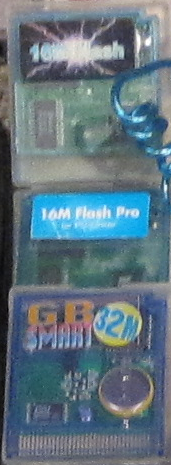
			<content type="html"><![CDATA[<p>BUMP.<br />Sorry I never replied, I&#039;ve been really busy with work for the past couple of months and haven&#039;t really had time to mess with any of this stuff until tonight.<br />I&#039;ve made progress, though!<br />Not sure how, but the Transferrer II software started recognizing the cartridges.<br />I still have a problem, though.<br />It recognizes the &quot;16M Flash&quot; and &quot;16M Flash Pro&quot; as a &quot;Normal Game Cartridge&quot;.<br />It says the card name for both of them is &quot;Coder_jr&quot; and under the size section it just says &quot;Transfering Data ......&quot;<br />After a bit of Googling, I&#039;ve found this, which I&#039;ve got everything for except the program.<br /><a href="http://n64.icequake.net/mirror/64scener.parodius.com/gbpclink.htm" target="_blank">http://n64.icequake.net/mirror/64scener &#133; pclink.htm</a><br />I&#039;m still looking for that.<br />The regular 32M Smart cards still aren&#039;t recognized. It still gives me the same &quot;Error 542: connection problems.&quot;<br />Any ideas?</p><p>Also, here&#039;s a photo of the cartridges in question.<br /><a class="postimg" href="http://www.brickshelf.com/gallery/TheJorsh/random-stuff/carts.png" title="http://www.brickshelf.com/gallery/TheJorsh/random-stuff/carts.png" id="forum_image_28102257"><img src="http://www.brickshelf.com/gallery/TheJorsh/random-stuff/carts.png" /></a><br />Sorry for the crappy quality and the wormlight cord in the way. It&#039;s from a bigger picture I took of all my handheld stuff together.<br />I&#039;ve got the two on the top, and five of the bottom one.</p>]]></content>
			<author>
				<name><![CDATA[PianoGameboy]]></name>
				<uri>https://chipmusic.org/PianoGameboy</uri>
			</author>
			<updated>2011-12-07T03:34:48Z</updated>
			<id>https://chipmusic.org/forums/post/83593/#p83593</id>
		</entry>
		<entry>
			<title type="html"><![CDATA[Re: THIS GB TRANSFERER 2 IS OF THE DEVIL.]]></title>
			<link rel="alternate" href="https://chipmusic.org/forums/post/78504/#p78504"/>
			<content type="html"><![CDATA[<p>give <a href="http://ucon64.sourceforge.net/" target="_blank">http://ucon64.sourceforge.net/</a> Ucon64 a go - lots of different options for lots of different carts/interfaces \o_</p>]]></content>
			<author>
				<name><![CDATA[ne7]]></name>
				<uri>https://chipmusic.org/ne7</uri>
			</author>
			<updated>2011-09-18T19:35:07Z</updated>
			<id>https://chipmusic.org/forums/post/78504/#p78504</id>
		</entry>
		<entry>
			<title type="html"><![CDATA[Re: THIS GB TRANSFERER 2 IS OF THE DEVIL.]]></title>
			<link rel="alternate" href="https://chipmusic.org/forums/post/78235/#p78235"/>
			<content type="html"><![CDATA[<p>nitro2k01, maybe is just broken and our &quot;theories&quot; are probably rubbish, specially mines! XDD. Or maybe he is just using the wrong version. Also, you wont belive me, but those worked on mine. Especially the BLOW IT. I think the best, is wait till he tell us if they are new or used (sounds like used cuz of teh BUNCH and 2 transfers II). And probably as you said, they are just broken! <img src="https://chipmusic.org/forums/img/smilies/sad.png" width="15" height="15" alt="sad" /></p>]]></content>
			<author>
				<name><![CDATA[ui]]></name>
				<uri>https://chipmusic.org/ui</uri>
			</author>
			<updated>2011-09-14T21:23:50Z</updated>
			<id>https://chipmusic.org/forums/post/78235/#p78235</id>
		</entry>
		<entry>
			<title type="html"><![CDATA[Re: THIS GB TRANSFERER 2 IS OF THE DEVIL.]]></title>
			<link rel="alternate" href="https://chipmusic.org/forums/post/78231/#p78231"/>
			<content type="html"><![CDATA[<p>ui: I&#039;m sorry but I don&#039;t think your advice will do much.</p><p>- Blow it, same with the cart. Sometimes is just that, so try it, also clean the Cart if possible.<br />This is good for much, but a dirty cartridge shouldn&#039;t give a connection error.</p><p>- Try to use the USB power in the back of the computer connections. Dont use the front connections. (hope you understand this)<br />I don&#039;t think this should matter unless the front connections are completely unconnected. On some computers the front USB ports are USB 1.0 and slower when used with USB sticks and such. However, transferrer is using USB only for power.</p><p>- Check the program, you need the right one, as kitsch said. I tried in various Windows versions and i can tell is no that.<br />He already said ini the second post which software he&#039;s using, and it&#039;s the correct one. (Assuming his hardware is actually Transferer 2 and not Transferer 1.)</p><p>- This maybe will sounds &quot;stupid&quot;. But have you ever tried to copy/load the program from DESKTOP or C:\ root?<br />Hmmm... This can create problems with the file listing on some versions of the software because there are hidden files in the root which will make the file list appear empty, but this isn&#039;t the problem here.</p><p>- Try the different windows compatibility in case you haven&#039;t.<br />On Windows XP, this should make no difference, as the Transferer 2 software is XP compatible.</p><p>My bet is on the wrong kind of LPT cable, or maybe maybe that the unit was fried from a bad power adapter.</p>]]></content>
			<author>
				<name><![CDATA[nitro2k01]]></name>
				<uri>https://chipmusic.org/nitro2k01</uri>
			</author>
			<updated>2011-09-14T20:58:34Z</updated>
			<id>https://chipmusic.org/forums/post/78231/#p78231</id>
		</entry>
		<entry>
			<title type="html"><![CDATA[Re: THIS GB TRANSFERER 2 IS OF THE DEVIL.]]></title>
			<link rel="alternate" href="https://chipmusic.org/forums/post/78230/#p78230"/>
			<content type="html"><![CDATA[<p>this transfer is a bit tricky form time to time<br />What i have tried after many many errors, this list might sound stupid, but some of them worked for me.</p><p>- Blow it, same with the cart. Sometimes is just that, so try it, also clean the Cart if possible.<br />- Try to use the USB power in the back of the computer connections. Dont use the front connections. (hope you understand this)<br />- Check the program, you need the right one, as kitsch said. I tried in various Windows versions and i can tell is no that.<br />- This maybe will sounds &quot;stupid&quot;. But have you ever tried to copy/load the program from DESKTOP or C:\ root?<br />- Try the different windows compatibility in case you haven&#039;t.</p><p>good luck</p>]]></content>
			<author>
				<name><![CDATA[ui]]></name>
				<uri>https://chipmusic.org/ui</uri>
			</author>
			<updated>2011-09-14T20:46:41Z</updated>
			<id>https://chipmusic.org/forums/post/78230/#p78230</id>
		</entry>
		<entry>
			<title type="html"><![CDATA[Re: THIS GB TRANSFERER 2 IS OF THE DEVIL.]]></title>
			<link rel="alternate" href="https://chipmusic.org/forums/post/78227/#p78227"/>
			<content type="html"><![CDATA[<p>Have you ever gotten any other message than &quot;connection problems&quot; while not having a cartidge inserted? (Should tell you that no cartridge is inserted in really broken English.)</p><p>Did you buy them new or used? </p><p>Transferer 2 is using a different power connector. Connecting almost anything other than the USB cable that comes with the unit will instantly fry it. <br />The USB cable is 5V center positive (if I recall correctly.) Transferer 1 requires 9V (or higher) center <strong>negative</strong>, again if I recall correctly. This will (probably) fry the unit on the first try, so if you bought them used, maybe they are simply broken.</p><p>What the position of the power switch? The middle position is for GB while the other position are for GBA and power off. Even though it shouldn&#039;t report connection problems if the switch is in GBA mode, it&#039;s worth checking.</p><p>What kind of LPT cable are you using? There are two different kinds, Laplink and 1 to 1. They look the same on the outside (DB25 male to male) but differ in their connections. Laplink cables have their wires connected in a way that is beneficial for file transfer between two computers. But they are not compatible with any transferer. On a 1 to 1 cable, each pin will go to the same pin on the other side</p><p>If you have a multimeter, you can check which type of cable you have. Put your meter into diode/continuity mode and probe pin 1/pin 1 then pin 2/pin 2 and so on for a couple of pins. Make sure you don&#039;t touch the shielding, as that may five you false positive readings. If that doesn&#039;t work, the cable is a Laplink cable (or severly broken) and will not work. If you didn&#039;t get the cables from EMS, chances are they are Laplink cables.</p><p>What&#039;s the LPT port configured as in BIOS? I&#039;ve never been able to consistently figure out which mode is the right one to use, but you should at least check that it&#039;s enabled in BIOS and that the base address is matching the setting in the program. You can also check the base address in the Windows device manager.</p><p>As for UserPort and GiveIO: No need for these things. The 2000/XP version of all transferer software come with their own driver that handles the low level access. It will probably even interfere with the Transferer software&#039;s own driver.<br />UserPort/GiveIO are for using legacy software (Win 95/98) on 2000/XP. You should never (and can&#039;t) install these drivers on 95/98. Also, if you legitimately need to install a driver to enable direct LPT port access, use UserPort, not GiveIO. But again, that&#039;s beside the point. Also, start the UserPort application and make sure the driver is not running. Same thing with GiveIO. Just to be sure.</p><p>As for your cartridges: The one that says PC linker will not work with your Transferer. However, I might be interested in this cartridge for research purposes... The one that says 16M flash may or may not work, depending on which kind it is. Could you take a picture of it?</p><p>Sorry for the information overload. Hopefully some of it will make sense. If something is unclear, well ask... <img src="https://chipmusic.org/forums/img/smilies/smile.png" width="15" height="15" alt="smile" /></p>]]></content>
			<author>
				<name><![CDATA[nitro2k01]]></name>
				<uri>https://chipmusic.org/nitro2k01</uri>
			</author>
			<updated>2011-09-14T20:24:49Z</updated>
			<id>https://chipmusic.org/forums/post/78227/#p78227</id>
		</entry>
		<entry>
			<title type="html"><![CDATA[Re: THIS GB TRANSFERER 2 IS OF THE DEVIL.]]></title>
			<link rel="alternate" href="https://chipmusic.org/forums/post/78183/#p78183"/>
			<content type="html"><![CDATA[<p>the only thing i can think of, and only because you didnt specify otherwise: are you trying to use the USB port to transfer data? because the USB is only for powering the transferer, and the data needs to be transfered through the serial port</p>]]></content>
			<author>
				<name><![CDATA[Saskrotch]]></name>
				<uri>https://chipmusic.org/Saskrotch</uri>
			</author>
			<updated>2011-09-14T09:11:48Z</updated>
			<id>https://chipmusic.org/forums/post/78183/#p78183</id>
		</entry>
		<entry>
			<title type="html"><![CDATA[Re: THIS GB TRANSFERER 2 IS OF THE DEVIL.]]></title>
			<link rel="alternate" href="https://chipmusic.org/forums/post/78174/#p78174"/>
			<content type="html"><![CDATA[<p>better try all the configuration avaliable. good luck with that hardware.</p>]]></content>
			<author>
				<name><![CDATA[Analog]]></name>
				<uri>https://chipmusic.org/Analog</uri>
			</author>
			<updated>2011-09-14T05:13:50Z</updated>
			<id>https://chipmusic.org/forums/post/78174/#p78174</id>
		</entry>
		<entry>
			<title type="html"><![CDATA[Re: THIS GB TRANSFERER 2 IS OF THE DEVIL.]]></title>
			<link rel="alternate" href="https://chipmusic.org/forums/post/78173/#p78173"/>
			<content type="html"><![CDATA[<p>I found a topic on 8BC earlier where someone said it should be set to EPP mode, but that didn&#039;t work for me.<br />Should I have done something different?</p>]]></content>
			<author>
				<name><![CDATA[PianoGameboy]]></name>
				<uri>https://chipmusic.org/PianoGameboy</uri>
			</author>
			<updated>2011-09-14T04:49:26Z</updated>
			<id>https://chipmusic.org/forums/post/78173/#p78173</id>
		</entry>
		<entry>
			<title type="html"><![CDATA[Re: THIS GB TRANSFERER 2 IS OF THE DEVIL.]]></title>
			<link rel="alternate" href="https://chipmusic.org/forums/post/78172/#p78172"/>
			<content type="html"><![CDATA[<p>have you tried configurating the LPT port from the bios?</p>]]></content>
			<author>
				<name><![CDATA[Analog]]></name>
				<uri>https://chipmusic.org/Analog</uri>
			</author>
			<updated>2011-09-14T04:40:24Z</updated>
			<id>https://chipmusic.org/forums/post/78172/#p78172</id>
		</entry>
		<entry>
			<title type="html"><![CDATA[Re: THIS GB TRANSFERER 2 IS OF THE DEVIL.]]></title>
			<link rel="alternate" href="https://chipmusic.org/forums/post/78171/#p78171"/>
			<content type="html"><![CDATA[<p>I have the little blue mini-cd it came with labeled &quot;GB TRANSFERER 2&quot;, which has three different programs on it:<br />Both the 2k/XP version and 98/ME version of &quot;GB Smart Writer(transfer 2)&quot;, and &quot;XLinker 4.1&quot;.<br />I&#039;ve tried each of them already.<br />And yeah, I&#039;ve got the switch in GB mode. I tried both GB and GBA anyway, just in case, and still no progress.<br /><img src="https://chipmusic.org/forums/img/smilies/hmm.png" width="15" height="15" alt="hmm" /></p>]]></content>
			<author>
				<name><![CDATA[PianoGameboy]]></name>
				<uri>https://chipmusic.org/PianoGameboy</uri>
			</author>
			<updated>2011-09-14T04:35:45Z</updated>
			<id>https://chipmusic.org/forums/post/78171/#p78171</id>
		</entry>
</feed>
