<?xml version="1.0" encoding="utf-8"?>
<feed xmlns="http://www.w3.org/2005/Atom">
	<title type="html"><![CDATA[ChipMusic.org - GBP missing vertical pixels Help?]]></title>
	<link rel="self" href="https://chipmusic.org:80/forums/feed/atom/topic/8105/"/>
	<updated>2012-08-14T10:56:55Z</updated>
	<generator>PunBB</generator>
	<id>https://chipmusic.org/forums/topic/8105/gbp-missing-vertical-pixels-help/</id>
		<entry>
			<title type="html"><![CDATA[Re: GBP missing vertical pixels Help?]]></title>
			<link rel="alternate" href="https://chipmusic.org/forums/post/126485/#p126485"/>
			<content type="html"><![CDATA[<p>I know with DMG&#039;s you can use a soldering iron to reflow the solder in the ribbon cable and fix these line. Vertical lines are fixeable on the DMG, horizontal lines are near impossible. I&#039;ll look for the tutorial and post it here, you can see if you can do it on this one too.</p><p>EDIT: Apeshit&#039;s modding guide has a tutorial on how to fix horizontal lines, but I thought there was a more in depth one somewhere on chipmusic.org<br /><a href="http://chipmusic.org/forums/topic/6324/apeshits-gameboy-modding-guide/" target="_blank">http://chipmusic.org/forums/topic/6324/ &#133; ing-guide/</a></p>]]></content>
			<author>
				<name><![CDATA[Lavar]]></name>
				<uri>https://chipmusic.org/Lavar</uri>
			</author>
			<updated>2012-08-14T10:56:55Z</updated>
			<id>https://chipmusic.org/forums/post/126485/#p126485</id>
		</entry>
		<entry>
			<title type="html"><![CDATA[Re: GBP missing vertical pixels Help?]]></title>
			<link rel="alternate" href="https://chipmusic.org/forums/post/126472/#p126472"/>
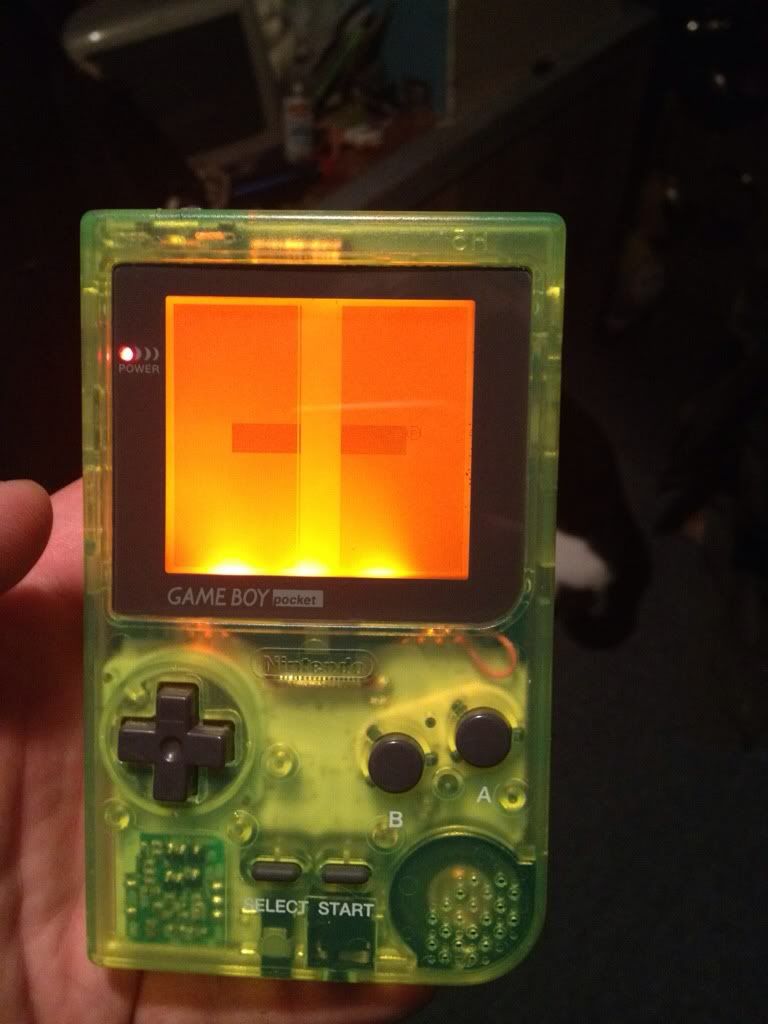
			<content type="html"><![CDATA[<p>Yea that may be it. They look connected to be honest ad I didnt unsolder it while backlighting it but I&#039;ll pinch it and see if it fixes it and if so ill fiddle around with my iron a bit. I&#039;d hate to have to hunt down another pocket screen to replace it with or another pocket to salvage for this one. I definitely want to get it fixed though because of what color it is. It&#039;s one of my prized babies. T_T</p>]]></content>
			<author>
				<name><![CDATA[Vex]]></name>
				<uri>https://chipmusic.org/Vex</uri>
			</author>
			<updated>2012-08-14T08:57:40Z</updated>
			<id>https://chipmusic.org/forums/post/126472/#p126472</id>
		</entry>
		<entry>
			<title type="html"><![CDATA[Re: GBP missing vertical pixels Help?]]></title>
			<link rel="alternate" href="https://chipmusic.org/forums/post/126448/#p126448"/>
			<content type="html"><![CDATA[<p>Looks like some of the bottom pins got disconnected. I can&#039;t remember who said that they actually unsolder (think it was justin and maize) that part when backlighting it. They may be able to help.</p>]]></content>
			<author>
				<name><![CDATA[Vile]]></name>
				<uri>https://chipmusic.org/Vile</uri>
			</author>
			<updated>2012-08-14T05:07:28Z</updated>
			<id>https://chipmusic.org/forums/post/126448/#p126448</id>
		</entry>
		<entry>
			<title type="html"><![CDATA[GBP missing vertical pixels Help?]]></title>
			<link rel="alternate" href="https://chipmusic.org/forums/post/126414/#p126414"/>
			<content type="html"><![CDATA[<p>Hey guys recently did a backlight on a pocket and when I was done its missing some vertical lines in the middle. Is there any known fix like there is for the DMG or what? Any tips? Anything you have that can maybe help please share.</p><p>Here&#039;s a pic:</p><p><a class="postimg" href="http://i1214.photobucket.com/albums/cc490/Vexling05/74D0737D-938E-4B3F-AFF9-897F9CB0866B-748-0000014D47635C73.jpg" title="http://i1214.photobucket.com/albums/cc490/Vexling05/74D0737D-938E-4B3F-AFF9-897F9CB0866B-748-0000014D47635C73.jpg" id="forum_image_9224642"><img src="http://i1214.photobucket.com/albums/cc490/Vexling05/74D0737D-938E-4B3F-AFF9-897F9CB0866B-748-0000014D47635C73.jpg" /></a></p>]]></content>
			<author>
				<name><![CDATA[Vex]]></name>
				<uri>https://chipmusic.org/Vex</uri>
			</author>
			<updated>2012-08-14T01:58:54Z</updated>
			<id>https://chipmusic.org/forums/post/126414/#p126414</id>
		</entry>
</feed>